
Do Not Sell My Personal Information Jump to content
View in the app

A better way to browse. Learn more.

Subaru Owners Club UK | Subaru Forums

A full-screen app on your home screen with push notifications, badges and more.

To install this app on iOS and iPadOS
  1. Tap the Share icon in Safari
  2. Scroll the menu and tap Add to Home Screen.
  3. Tap Add in the top-right corner.
To install this app on Android
  1. Tap the 3-dot menu (⋮) in the top-right corner of the browser.
  2. Tap Add to Home screen or Install app.
  3. Confirm by tapping Install.

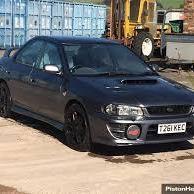
evening everyone. my first ever post. just bought rb5 161. know nothing about the cars history, what its had done, best place to buy parts, what to check and look out for etc etc. any advice or info would be greatly accepted.  would love to get in touch with previous owners of the car to ask whats been done if it has any problems or things to look out for. also track down service history as i was told a previous owner has miss placed it. fingers crossed its been found.  any info at all regarding subarus in general, best place for parts and what the best makes or brands to go for example clutches, timing belts etc, also what maintenance and regular checks i should be doing. would love to go to my first ever car meet.  cant wait to get it back to looking how it should


hope to get to know some of yous soon


many thanks


greg

  • From the album:

    rb5 161

    · 2 images


    Background Picker
    Customize Layout

    Configure browser push notifications

    Chrome (Android)
    1. Tap the lock icon next to the address bar.
    2. Tap Permissions → Notifications.
    3. Adjust your preference.
    Chrome (Desktop)
    1. Click the padlock icon in the address bar.
    2. Select Site settings.
    3. Find Notifications and adjust your preference.