
Do Not Sell My Personal Information Jump to content
View in the app

A better way to browse. Learn more.

Subaru Owners Club UK | Subaru Forums

A full-screen app on your home screen with push notifications, badges and more.

To install this app on iOS and iPadOS
  1. Tap the Share icon in Safari
  2. Scroll the menu and tap Add to Home Screen.
  3. Tap Add in the top-right corner.
To install this app on Android
  1. Tap the 3-dot menu (⋮) in the top-right corner of the browser.
  2. Tap Add to Home screen or Install app.
  3. Confirm by tapping Install.

Tomtomxl123

Members
  • Joined

  • Last visited

Everything posted by Tomtomxl123

  1. Yes loving it a lot!! That's great thanks so much for your help!!
  2. Thanks a lot mate! I have always chosen car brands that a slightly different as my other car is a SSangyong. Please do let me know if you do happen to come across anything!
  3. Thanks for the reply! I'm not great with electrics only can only change a bulb and that's as adventurous I get!!
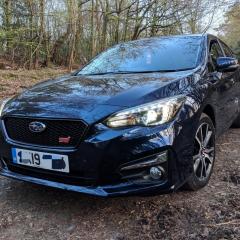
  4. Does anyone know how to enable welcome lights and audible locking on a 2019 Impreza? Japan and US spec cars both come with these features but cannot seem to find it on my car. Is it possible to get them fitted or does anyone have any suggestions? I have found "follow me home lights" but that is it. Thanks
Background Picker
Customize Layout

Account

Navigation

Search

Configure browser push notifications

Chrome (Android)
  1. Tap the lock icon next to the address bar.
  2. Tap Permissions → Notifications.
  3. Adjust your preference.
Chrome (Desktop)
  1. Click the padlock icon in the address bar.
  2. Select Site settings.
  3. Find Notifications and adjust your preference.