
Skip to content
View in the app

A better way to browse. Learn more.

Subaru Owners Club UK | Subaru Forums

A full-screen app on your home screen with push notifications, badges and more.

To install this app on iOS and iPadOS
  1. Tap the Share icon in Safari
  2. Scroll the menu and tap Add to Home Screen.
  3. Tap Add in the top-right corner.
To install this app on Android
  1. Tap the 3-dot menu (⋮) in the top-right corner of the browser.
  2. Tap Add to Home screen or Install app.
  3. Confirm by tapping Install.

PaulieK

Members
  • Joined

  • Last visited

  1. PaulieK joined the community
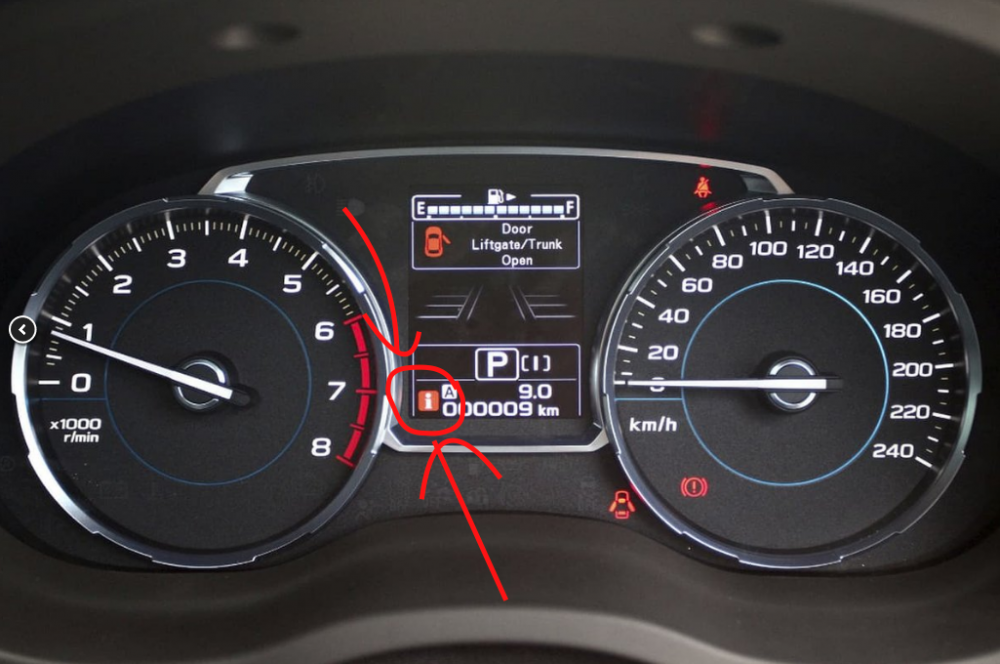
  2. Hi! I'm a new member hoping someone might be able to please help me identify what the red "i" warning icon to the left of the odometer means? I've poured through the manual & online, to no avail. Does anyone know what this means? I only ever notice it at the end of my drive, as in when I pull in at home. It doesn't come on when I start up & set off. Please see photo attached, icon circled & arrowed in red - it's not my own dash, but it is the same icon showing & this is the one single photo I was able to find on the Internet of it! Can't find any mention of it in the manual. Home someone might know. Thank you, Paul
Background Picker
Customize Layout

Account

Navigation

Search

Search

Configure browser push notifications

Chrome (Android)
  1. Tap the lock icon next to the address bar.
  2. Tap Permissions → Notifications.
  3. Adjust your preference.
Chrome (Desktop)
  1. Click the padlock icon in the address bar.
  2. Select Site settings.
  3. Find Notifications and adjust your preference.