


wuf
Members
-
Joined
-
Last visited
Everything posted by wuf
-
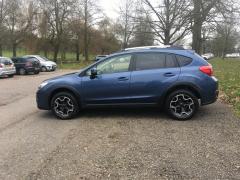 thats a relief -- and I notice quite a lot of crash protection around the XV - good to know... Thanks for all the greetings -- hope to see some of you soon......??
 -
Crash well -- that does'nt sound good?
-
-
-
Hi all - at last I am a Subi owner! 😀 I plumped for an XV as I shoot and fish and need cross country abilities. What a solid motor. And within just a few months of ownership what a Company! 😍 Subaru recalled my motor, despite the fact that I am the third owner, and the car is over 7 years old!! I cannot believe other larger car manufacturers would do the same once the guarantee period has passed (never happened to me before)..... I was wonderfully gobsmacked. And the garage (Adams Bros Aylesbury) did a quick and wonderful job - engine just flies now! I have many decades of driving experiences, have driven/owned more than a hundred makes/models including super Skyline, roadsters, Porsches, Jaguars, BMW, etc but none like this....so you can see why I am so impressed!! Now I think I understand why Subaru owners are so solid behind their cars. Great to be on the team and looking forward to meeting up with other Subaru Owners at local meets - so let me know whats on and when!
