
Jump to content
View in the app

A better way to browse. Learn more.

Subaru Owners Club UK | Subaru Forums

A full-screen app on your home screen with push notifications, badges and more.

To install this app on iOS and iPadOS
  1. Tap the Share icon in Safari
  2. Scroll the menu and tap Add to Home Screen.
  3. Tap Add in the top-right corner.
To install this app on Android
  1. Tap the 3-dot menu (โ‹ฎ) in the top-right corner of the browser.
  2. Tap Add to Home screen or Install app.
  3. Confirm by tapping Install.

Dan B89

Members
  • Joined

  • Last visited

Everything posted by Dan B89

  1. Ok mate thanks
  2. I will, just don't want to brake it waited years to get Scooby, it's almost too good to be true, i have 4 children so theve had everything, so now is my time to be little selfish ๐Ÿ˜Š
  3. And yes is hawk eye mate
  4. Nice mate, and thanks for advice, I'm unsure of how long I should let it warm up/cool down before and after fun time ha ha
  5. Hello all, as a newbie I thought would ask the pros, what time is best to let Subaru warm up/cool down before and after fun time, i wasn't sure on best time scale
  6. will do my best๐Ÿ˜‰
  7. ha ha legend! And thanks for the advice
  8. ๐Ÿ˜๐Ÿ˜ hello and thank you, will get some more pics up soon as possible, got travel 101 miles to fetch it on Wednesday so will be nice drive back ๐Ÿ˜Ž just got to get there first ha ha
  9. Thank you, Yes I will do my best, may make some cosmetic changes(front and rear lights are a bit misty)but apart from that will leave standard I think,been today and signed all paper work got to pick up on Wednesday can't wait!
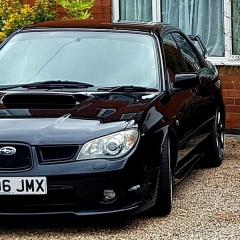
  10. Hello all, my name is Dan today is the day I've waited for a long time, bought my first Subaru 2.5wrx 2006, so I thought I would pop on here say hello, and hear if there's any big do's and donts ha ha, mine fully standard, not been messed with(as far as I'm aware) no knocking,signs of fluid leaks, etc Got full service history, i hope I don't regret it...
Background Picker
Customize Layout

Account

Navigation

Search

Configure browser push notifications

Chrome (Android)
  1. Tap the lock icon next to the address bar.
  2. Tap Permissions โ†’ Notifications.
  3. Adjust your preference.
Chrome (Desktop)
  1. Click the padlock icon in the address bar.
  2. Select Site settings.
  3. Find Notifications and adjust your preference.
