Tempo2007
Members
-
Joined
-
Last visited
-
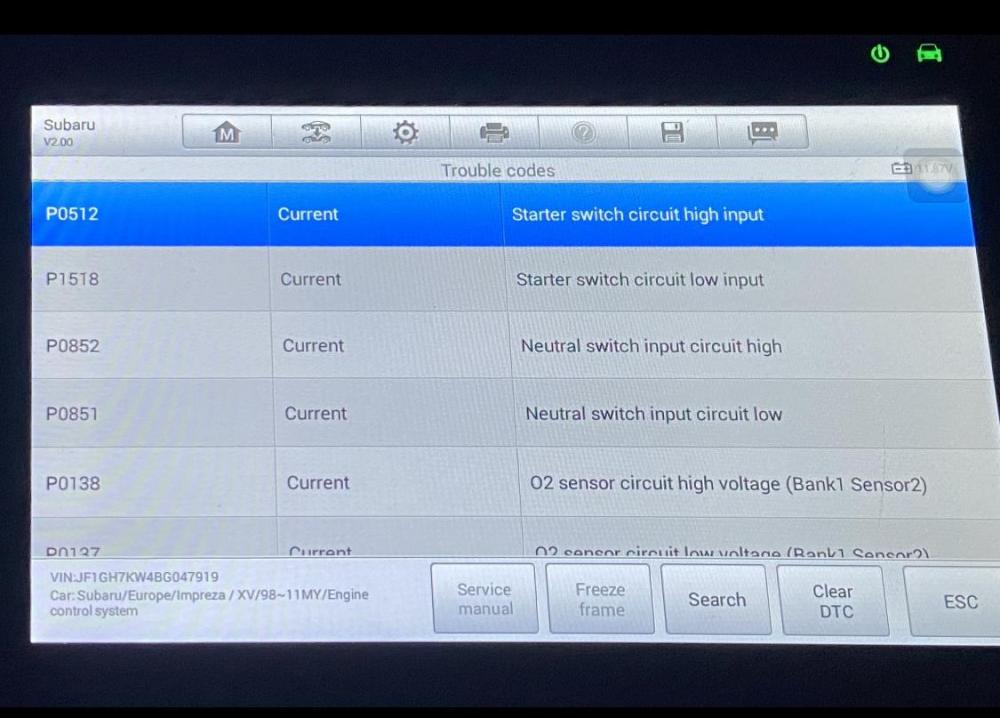
Hi all, so I’ve swapped my perfect running 08 BMW 118D for a 60 (2010) plate Suburu Impreza R C; it’s a cat C repaired and has only done 46000 genuine miles has had timing belt changed along side a few other bits (brakes / clutch etc) issues ... now when I swapped the guy told me it had an o2 sensor issue and occasionally it’d lack power which he rectified by putting it into low LO gear ratio using the AWD selector handle thing (whatever it’s called)... as it turns out for a 2.0 petrol non turbo it has a massive loss of power, it struggles getting up hills and on the flat it feels sluggish too (with the AWD Selector in high) when its in LO it’s a tiny bit better but still feels sluggish. issue 2 with the engine off but ignition on there’s a clicking coming from the glove box area, and also under the bonnet the fan will constantly stop; and start repeatedly, with engine on click gone and fan is normal but with it off it’s constant clicking and engine fan on / off im at a loss ... ive run an OBD which has shown the following but again I’ve no idea why would it show high AND low voltage issues ?! only other issues is it feels wobbly on the road but I presume that could be bad ball joint / tracking etc; that and it’s in need of a bit of TLC cosmetically is it beyond economical repair / is this scooby dead or is it a few simple fixes? thanks in advance - I have no idea what the damage was causing it to be a cat C I only know it was repaired (apparently)