
Do Not Sell My Personal Information Jump to content
View in the app

A better way to browse. Learn more.

Subaru Owners Club UK | Subaru Forums

A full-screen app on your home screen with push notifications, badges and more.

To install this app on iOS and iPadOS
  1. Tap the Share icon in Safari
  2. Scroll the menu and tap Add to Home Screen.
  3. Tap Add in the top-right corner.
To install this app on Android
  1. Tap the 3-dot menu (⋮) in the top-right corner of the browser.
  2. Tap Add to Home screen or Install app.
  3. Confirm by tapping Install.

Headonastick

Members
  • Joined

  • Last visited

  1. Yeah just having a look on ebay there's a few breaking Foresters so might just drop on one, thanks for the advice it's really appreciated.
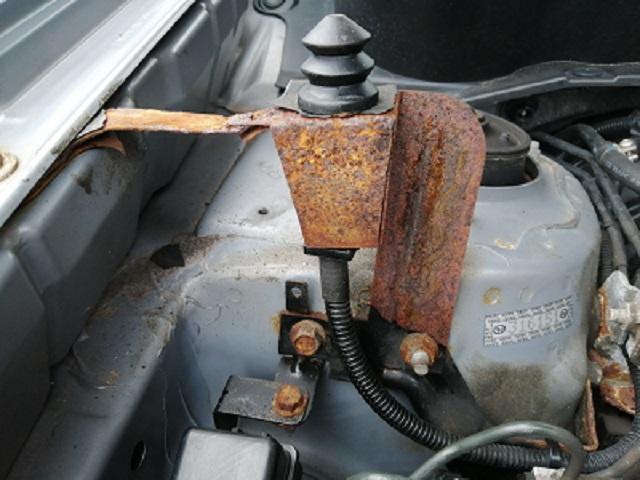
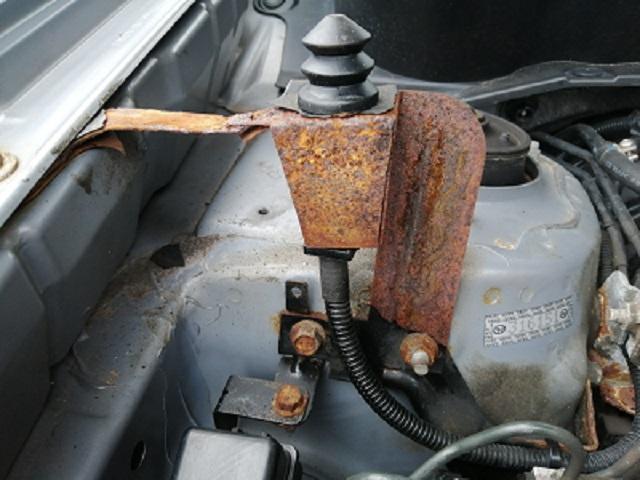
  2. Yeah that's it, not mechanically minded enough to start messing with it though I'll have to see if my local garage can have a go. It'll have to be replaced though as the metal is seriously thin.
  3. Is this the bit that you mean? It's quite rusty so I'm guessing that could be bent, doe'snt look easy to replace either!
  4. I've just bought a 59 plate Forester (my very 1st Subaru), it's a single button fob which when I press it to lock up the car beeps 5 times then the alarm goes off, press it again alarm stops and drivers door only unlocks. I'm assuming it's the standard factory fitted alarm. I've no owners manual so has anyone got any ideas what the problem might be?
Background Picker
Customize Layout

Configure browser push notifications

Chrome (Android)
  1. Tap the lock icon next to the address bar.
  2. Tap Permissions → Notifications.
  3. Adjust your preference.
Chrome (Desktop)
  1. Click the padlock icon in the address bar.
  2. Select Site settings.
  3. Find Notifications and adjust your preference.