
Do Not Sell My Personal Information Jump to content
View in the app

A better way to browse. Learn more.

Subaru Owners Club UK | Subaru Forums

A full-screen app on your home screen with push notifications, badges and more.

To install this app on iOS and iPadOS
  1. Tap the Share icon in Safari
  2. Scroll the menu and tap Add to Home Screen.
  3. Tap Add in the top-right corner.
To install this app on Android
  1. Tap the 3-dot menu (⋮) in the top-right corner of the browser.
  2. Tap Add to Home screen or Install app.
  3. Confirm by tapping Install.

AdventureSi

Members
  • Joined

  • Last visited

  1. Lovely job... yep, looks like that.... just totally unfamiliar with the Impreza line up... Must be a few stock 19mm ones in the back of peoples sheds.. ha ha ha...
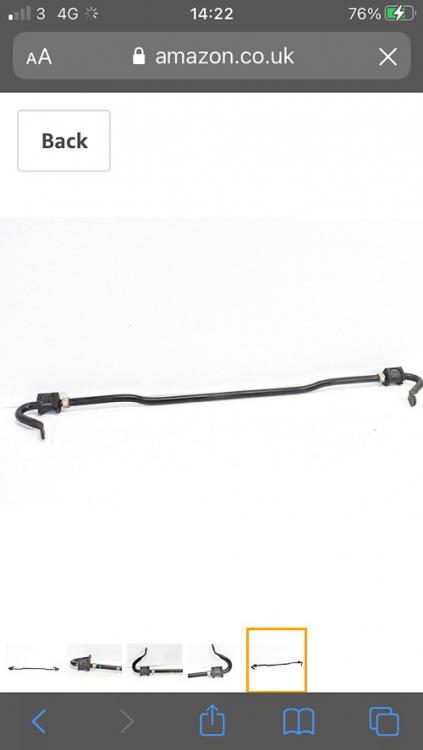
  2. I am after a rear anti roll bar that was standard on the GR (I think) Impreza. 19mm diameter. must be quite a few stock ones out there somewhere as it seems anti roll bars get upgraded often. this one is the type with the U shaped return ends to the drop links. (IC anyone can confirm the correct model it’s fitted to, that would be great too) Thank you it looks like this
  3. Hi Am in South Lincs. On my 4th Subaru, (still have 3 of them) current daily drives are 2001 2.5 Outback (the donkey) and new to the stable (Oct) a 2011 3.6 Outback.

Background Picker
Customize Layout

Configure browser push notifications

Chrome (Android)
  1. Tap the lock icon next to the address bar.
  2. Tap Permissions → Notifications.
  3. Adjust your preference.
Chrome (Desktop)
  1. Click the padlock icon in the address bar.
  2. Select Site settings.
  3. Find Notifications and adjust your preference.