
Do Not Sell My Personal Information Jump to content
View in the app

A better way to browse. Learn more.

Subaru Owners Club UK | Subaru Forums

A full-screen app on your home screen with push notifications, badges and more.

To install this app on iOS and iPadOS
  1. Tap the Share icon in Safari
  2. Scroll the menu and tap Add to Home Screen.
  3. Tap Add in the top-right corner.
To install this app on Android
  1. Tap the 3-dot menu (⋮) in the top-right corner of the browser.
  2. Tap Add to Home screen or Install app.
  3. Confirm by tapping Install.

Popolopolos

Members
  • Joined

  • Last visited

Everything posted by Popolopolos

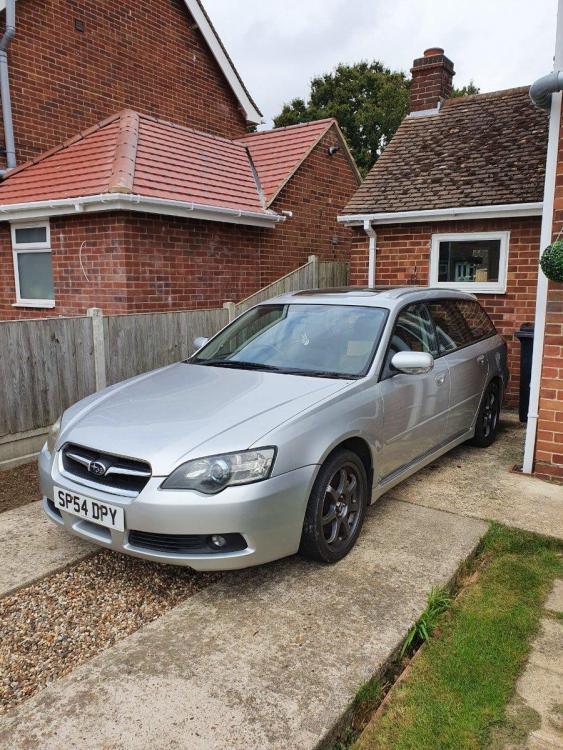
  1. Hi all, am a member over on the UKLegacy forum and posting this here for a few days as a last chance for someone to take the whole car for £1k before I try and set aside some time to break it. Runs and drives but no MOT and has been sat for three or four years. Here's a link to pics of the rust underneath https://drive.google.com/drive/folders/1dzvYGhZF7DPk6lz6iWb6Urjm-qCYEU9j?usp=sharing for those interested to see it. As such it would be best off as a parts car for the ez30 and/or the 6mt box and associated peripherals. Car is located near Frinton-on-Sea, Essex. There's a chap local to me with a flatbed if you'd like me to ask him for a transportation quote.
Background Picker
Customize Layout

Account

Navigation

Search

Configure browser push notifications

Chrome (Android)
  1. Tap the lock icon next to the address bar.
  2. Tap Permissions → Notifications.
  3. Adjust your preference.
Chrome (Desktop)
  1. Click the padlock icon in the address bar.
  2. Select Site settings.
  3. Find Notifications and adjust your preference.