
Do Not Sell My Personal Information Jump to content
View in the app

A better way to browse. Learn more.

Subaru Owners Club UK | Subaru Forums

A full-screen app on your home screen with push notifications, badges and more.

To install this app on iOS and iPadOS
  1. Tap the Share icon in Safari
  2. Scroll the menu and tap Add to Home Screen.
  3. Tap Add in the top-right corner.
To install this app on Android
  1. Tap the 3-dot menu (⋮) in the top-right corner of the browser.
  2. Tap Add to Home screen or Install app.
  3. Confirm by tapping Install.

Manonanisland

Members
  • Joined

  • Last visited

  1. Manonanisland changed their profile photo
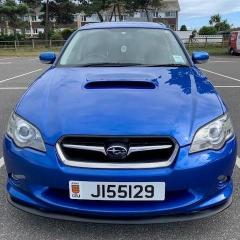
  2. Greetings everyone, I've owned my 2004 Legacy WR Limited (BP5) for almost 3 years now but i've only just joined this club and as such this is my first post. Really hoping someone can help me find a replacement clock as mine keeps flashing and cutting out. The part number is 85201AG010. I have looked everywhere I can on the web and cannot find a replacement as everywhere is saying this particular model is now discontinued. Hoping someone may be breaking/selling off parts and has the correct working model available. Alternatively if anyone else has had this issue and been able to repair theirs i'd appreciate their input into how to do so. Thanks all.
Background Picker
Customize Layout

Account

Navigation

Search

Configure browser push notifications

Chrome (Android)
  1. Tap the lock icon next to the address bar.
  2. Tap Permissions → Notifications.
  3. Adjust your preference.
Chrome (Desktop)
  1. Click the padlock icon in the address bar.
  2. Select Site settings.
  3. Find Notifications and adjust your preference.