


dazsowden
Members
-
Joined
-
Last visited
Everything posted by dazsowden
-
Yeap, its becomming a bit of a bugger trying to source a replacement
-
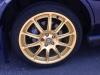
Guys, driving to work today got myself a flat tyre. Got it into the garage to check it out and found the alloy was cracked. First question is what's the PCD of the alloy, to make sure I get the right one. And second, does anyone have one they could sell me?
-
Will do chap
-
They easy to fit??
-
Yeah, I took a look at those, wasn't sure if they were the right ones, as they're so different to the standard. But excellent, may have to invest.. They do look !Removed! awesome colour coded on your sig pic, may have to buy some and spray them up to match the car :-)
-
-
Guys, ive just today picked up a 2001 impreza with what I think is described as Bugeye headlamps. Its the only thing letting the car down at the moment. Is there a decent straightforward conversion for these, not to costly?
-
Love this, thanks I'll take a look.
-
Hi guys, this is my first Subaru, in fact my first Japanese car. I thought I knew engines fairly well after years of BMW's and Audi's, but i've looked under the bonnet of this Subaru Impreza WRX and I feel like an absolute novice, wow. Looking forward to getting to grips with this beast :-)


