


LizzieImpreza21
Members
-
Joined
-
Last visited
-
Thanks everyone :) yeah I will do!
-
Put my name down, i'm definitely coming :D
-
haha :P they're the only photos i can find on my phone! :D
-
thank you :)Thanks :) i'm considering spraying it either black or dark blue but a bit indecisive at the minute as i don't know which would look best. i'm swaying towards black! She's pretty low :) still makes it over speedbumps so i'm happy!ahh grim! will have a look this weekend then :) thanks for the advice!
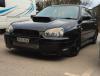 Thanks guys :) i'll get some pics up later, will hopefully have chance to give her a good clean this weekend so will get some proper pictures :Dthank you!Hey everyone, I've just bought by second Impreza WRX so thought it about time to join SOC and say hi :D She's a black 2003 blobeye, lowered on bc coilovers and bc adjustable top mounts, i've got loads of goodies already! Recently noticed a bit of a knocking noise from front drivers side, its not top mounts/ suspension, i was thinking it could be droplinks. Has anyone here had to do their droplinks and if so, are they a nightmare? advice please :)Hey guys, I'm new to subaru owners club but really wanna get on the stand with my WRX :) how do i go about paying for my car to be on the stand etc? Thanks :)




