


Loz
Members
-
Joined
-
Last visited
Everything posted by Loz
-

 Thanks! I was looking for a Black one, but when I saw this I had to buy it!
 -
Ace. Thanks I'll have a look.
-
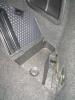
Got the tool roll, jack & hazard warning triangle. All of which look like they've never seen the light of day, which is nice! Here's a pic of the cubby on the right, is it supposed to have anything in there?
-
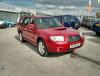
Hi, Picked up my 56 plate Forester XT last Friday & I'm already smitten. Coming from my previous car, a beat up £300 Mazda MX-3 3 it's quite a different animal! :D Just trying to enjoy it at the moment and not find fault too much, when it comes to cars, I'm a bit of an automotive hypochondriac. Though owning the Mazda was easy because I knew it was a jalopy from the outset lol. My new forester seems amazingly tidy in comparison & I hope to keep her for quite a while, there's already a few things I've got on my to do list, such getting a Chips away type person to clean up a handful of paint chips & a light scratch on one wing also there's an annoyingly empty space in one of the boot cubby holes where a tool clearly needs to live, I shall have to find the offending item & replace it and finally, I need to sort out the head unit wiring, it looks like some wires were just cut to remove it after sale. On the plus side I have a Shiny new Blaupunkt Double din head unit on it' way & all the necessary bits to allow to work with my steering wheel, I daren't look at the speakers just yet! I'll stop waffling now & I look forward to reading through the forums & meeting you all. :) Loz.

-




