paulhchawnwer
Members
-
Joined
-
Last visited
-
Thanks for info Jay
-
Cheers, Matty couldn't help at this time but not heard back from the others
-
many thanks matey
-
Been trying Fleabay but not had much luck so far. Are there any specialist breakers that you know of. Cheers Me Dears
-
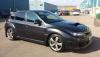
Hi Every one, i have had my 2009 330s for just over a year now. I had intended selling but i have decided to keep as my lads love to take out for a spin when they visit. I am after an original manual and service book etc as this did not come with anything apart from the Sat nav book. If anyone knows how/where i can get these from would be much appreciated.Also any info on remapping etc as what i have read this should be done Is there anyway of checking previous Service history. I have receipt for service at 30k and have just had service myself done at 38k. I suppose being 55 i am reliving my youth a bit lol but i do love the car. Cheers in advance if anyone can help Paul 07985369125