Do Not Sell My Personal Information Jump to content
View in the app

A better way to browse. Learn more.

Subaru Owners Club UK | Subaru Forums

A full-screen app on your home screen with push notifications, badges and more.

To install this app on iOS and iPadOS
  1. Tap the Share icon in Safari
  2. Scroll the menu and tap Add to Home Screen.
  3. Tap Add in the top-right corner.
To install this app on Android
  1. Tap the 3-dot menu (⋮) in the top-right corner of the browser.
  2. Tap Add to Home screen or Install app.
  3. Confirm by tapping Install.

Bucky789

Members
  • Joined

  • Last visited

Everything posted by Bucky789

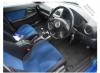
  1. Thanks for the fast reply, I know for a fact that it doesn't have the PPP exhaust it has an aftermarket brand. I shall have to check to see if it has the PPP certificate tomorrow. Here's the only pictures I currently have..... Would the log book be gospel? Or would giving subaru a call with the vin be the only true way of confirming? Thanks
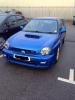
  2. Looking for some guidance as new to the world of subarus so any help would be very much appreciated. Looking at purchasing the above, all looks to be ok correct interior, brembo 6 pots on the front, 4s on the rear, STi intercooler front STi fog covers etc etc the log book also states WRX STi, any way of confirming it is and STi pro drive? The car does have subaru owners club stickers on so possibly someone on here may know the car. Thanks in advance
Background Picker
Customize Layout

Account

Navigation

Search

Configure browser push notifications

Chrome (Android)
  1. Tap the lock icon next to the address bar.
  2. Tap Permissions → Notifications.
  3. Adjust your preference.
Chrome (Desktop)
  1. Click the padlock icon in the address bar.
  2. Select Site settings.
  3. Find Notifications and adjust your preference.