


nzingler24
Members
-
Joined
-
Last visited
-
Good idea il have a look for groups on facebook thanks, they are definitely bright not to my taste but the style of wheel is nice so in the right colour should look good
-
Ah thanks Gambit that would be much appreciated its feeling sorry for itself without the spoiler, ive put a post in the wanted section too
-
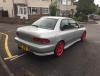
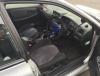
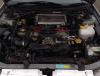
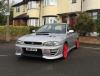
Morning guys and girls, im the proud owner of my first impreza a classic STI. Was imported in 2008 and was garaged for 3 years when it arrived in the country, its very straight with no rust and drives lovely :) its had an exhaust manifold a blitz nur spec full system and decat, had a greddy boost controller fitted in japan uprated fuel pump, ad looks to have been mapped as its boosting to 1.5 bar. Unfortunately it has been despoilered and has got red wheels so i want to put it back to standard, get the wheels sprayed a nice dark gunmetal/broze colour and get the original spoiler back on. I will keep the forum up to date with all the things i do, so just thought id introduce myself :) any help on sourcing a classic sti poiler is much appreciated.
-
Hi guys im after a classic sti spoiler, ive just brought a classic sti that has been despoilered and want to put it back to standard, many thanks



