


Christian
Members
-
Joined
-
Last visited
Everything posted by Christian
-
Thank you for your advise Mr.B
-
Thank you i agree... quality ??? I will take KYB other and last question: the front ones are classic shocks & springs nothing special about them for a SF5 Chassis i might as well change all of them finally Christian
-
Thank you for this verry detailed answer ( link ) so this will do the job ? http://www.ebay.co.uk/itm/HEAVY-DUTY-SUBARU-FORESTER-2-0-97-02-SF5-REAR-SHOCK-ABSORBER-COIL-SPRING-SET-/400326722425?hash=item5d35550379:m:mjI6YqExlWQCJQPNcg3PXfQ Thank you Christian
-
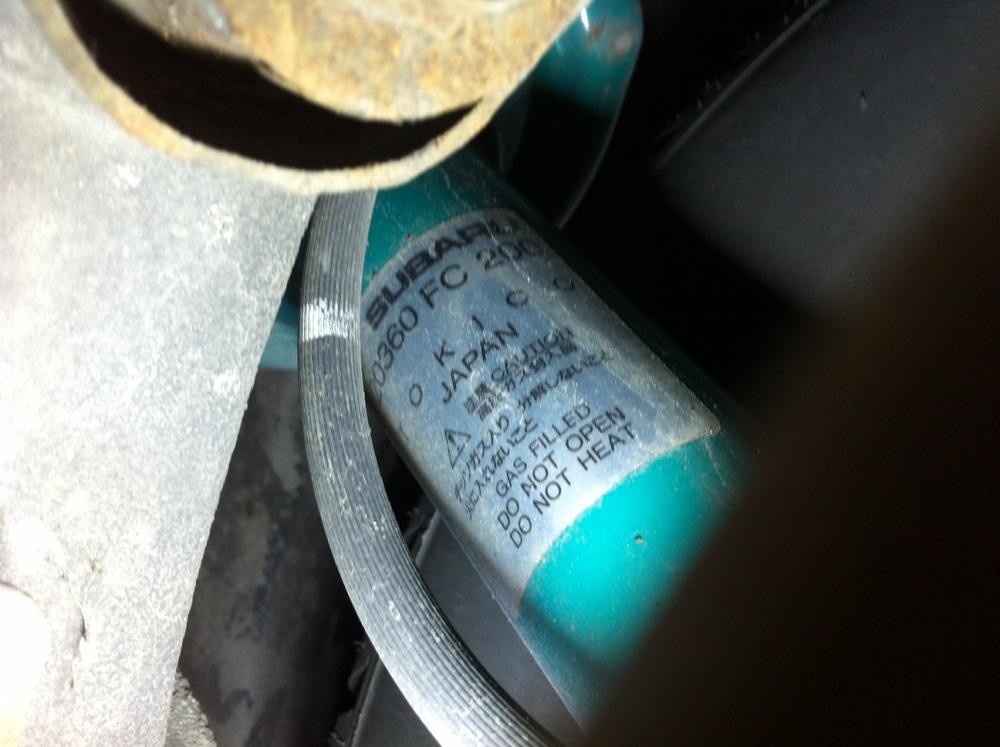
Hi, i will have to change the rear left stock absorber on a forester from 1997 90 kw the basic one. sorry posted this topic on the general forum also but maybe the Forester pros are more convinient my problem is: on the stock absorber is a number that does not mach with any subaru numbers (20360FC200). i called subaru and acording to the chassis N° it should be 20360FC210…but even this i can not find. My question as i DO NOT want to buy the part at Subaru’s far to expensive does anyone know what this part is and how it looks and if i cant find the pice can i mount other absorbera instead? i post an atachment of the one that is on now thank you verry much for some help Christian
-
Hello i am writing from switzerland, my wife ownes a subaru forester 1997 the basic one and for nothing in the world, well almost, i guess she would like tu divorce from her car...
