
Skip to content
View in the app

A better way to browse. Learn more.

Subaru Owners Club UK | Subaru Forums

A full-screen app on your home screen with push notifications, badges and more.

To install this app on iOS and iPadOS
  1. Tap the Share icon in Safari
  2. Scroll the menu and tap Add to Home Screen.
  3. Tap Add in the top-right corner.
To install this app on Android
  1. Tap the 3-dot menu (â‹®) in the top-right corner of the browser.
  2. Tap Add to Home screen or Install app.
  3. Confirm by tapping Install.

BillTheButcher

Members
  • Joined

  • Last visited

Everything posted by BillTheButcher

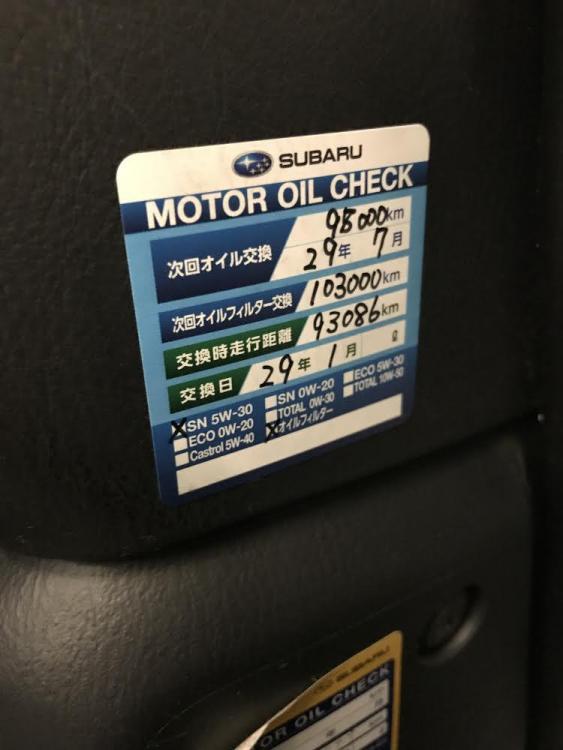
  1. Hello. 🙂 I'm currently on the hunt for a blobeye WRX hatch or wagon. With that in mind... Has anyone dealt with or bought from Quay Vehicle Solutions? They have all kinds of cars but most of their stock seems to be JDM imports. Reviews are good and the chap I've been dealing with has been helpful and responsive. I'm interested in one car in particular which looks very clean inside and out. My only issue is that the service history is in Japan. Is this normal? There is a service sticker with recent mileage on it (see below) but I have no idea what the rest of it says. Any help with translating the sticker or experience of Quay Vehicle Solutions would be much appreciated.
Background Picker
Customize Layout

Account

Navigation

Search

Search

Configure browser push notifications

Chrome (Android)
  1. Tap the lock icon next to the address bar.
  2. Tap Permissions → Notifications.
  3. Adjust your preference.
Chrome (Desktop)
  1. Click the padlock icon in the address bar.
  2. Select Site settings.
  3. Find Notifications and adjust your preference.