
Do Not Sell My Personal Information Jump to content
View in the app

A better way to browse. Learn more.

Subaru Owners Club UK | Subaru Forums

A full-screen app on your home screen with push notifications, badges and more.

To install this app on iOS and iPadOS
  1. Tap the Share icon in Safari
  2. Scroll the menu and tap Add to Home Screen.
  3. Tap Add in the top-right corner.
To install this app on Android
  1. Tap the 3-dot menu (⋮) in the top-right corner of the browser.
  2. Tap Add to Home screen or Install app.
  3. Confirm by tapping Install.

stuvette

Members
  • Joined

  • Last visited

  1. stuvette changed their profile photo
  2. wher do we find the keypad 4 digit code as I have the same problem???
  3. Hi can anybody help me try and find another main beam lamp for my car as its cracked hoping not to buy another lamp! lamp is the bottom right
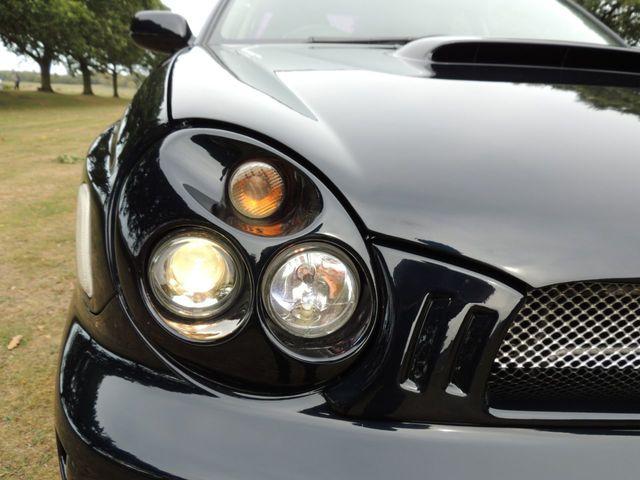
  4. oh ok thankyou for your reply I obviously didn't pay all that I did a trade in but I have loads of receipts for this car some are wow very steep on gearboxes and maps that's why I would like someone to look over or explain some of these invoices could be for.
  5. Hi everyone Just bought my first Subaru and so far I love its a 2002 plate is that too old?? its has so much done to it I was hoping if there was anyone around the Rushden, Northants area who could check her out and the invoices to help explain clearer what it has had done to it! hopefully be nice to meet up with you guys Stuart

Background Picker
Customize Layout

Configure browser push notifications

Chrome (Android)
  1. Tap the lock icon next to the address bar.
  2. Tap Permissions → Notifications.
  3. Adjust your preference.
Chrome (Desktop)
  1. Click the padlock icon in the address bar.
  2. Select Site settings.
  3. Find Notifications and adjust your preference.
