
Skip to content
View in the app

A better way to browse. Learn more.

Subaru Owners Club UK | Subaru Forums

A full-screen app on your home screen with push notifications, badges and more.

To install this app on iOS and iPadOS
  1. Tap the Share icon in Safari
  2. Scroll the menu and tap Add to Home Screen.
  3. Tap Add in the top-right corner.
To install this app on Android
  1. Tap the 3-dot menu (⋮) in the top-right corner of the browser.
  2. Tap Add to Home screen or Install app.
  3. Confirm by tapping Install.

KenEi

Members
  • Joined

  • Last visited

Everything posted by KenEi

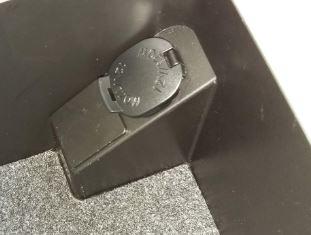
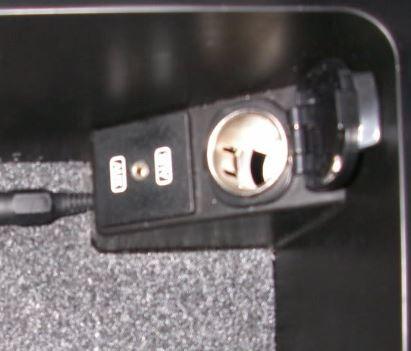
  1. Hello everyone, I'm looking to install an AUX input for my car, currently the inside of the arm rest looks like the following - However i've seen pictures that there's an optional that people can install, and the outcome should look like the following - Has anyone had any experience installing an additional AUX unit or an aftermarket unit that people can suggest? On Subaru's homepage the official product code is - H6210AG010 If anyone has a spare over and is willing to sell me one, then i would much appreciate it! Note - I Live in Estonia Best regards, Ken
Background Picker
Customize Layout

Account

Navigation

Search

Search

Configure browser push notifications

Chrome (Android)
  1. Tap the lock icon next to the address bar.
  2. Tap Permissions → Notifications.
  3. Adjust your preference.
Chrome (Desktop)
  1. Click the padlock icon in the address bar.
  2. Select Site settings.
  3. Find Notifications and adjust your preference.