Do Not Sell My Personal Information Jump to content
View in the app

A better way to browse. Learn more.

Subaru Owners Club UK | Subaru Forums

A full-screen app on your home screen with push notifications, badges and more.

To install this app on iOS and iPadOS
  1. Tap the Share icon in Safari
  2. Scroll the menu and tap Add to Home Screen.
  3. Tap Add in the top-right corner.
To install this app on Android
  1. Tap the 3-dot menu (⋮) in the top-right corner of the browser.
  2. Tap Add to Home screen or Install app.
  3. Confirm by tapping Install.

adidragan

Members
  • Joined

  • Last visited

Everything posted by adidragan

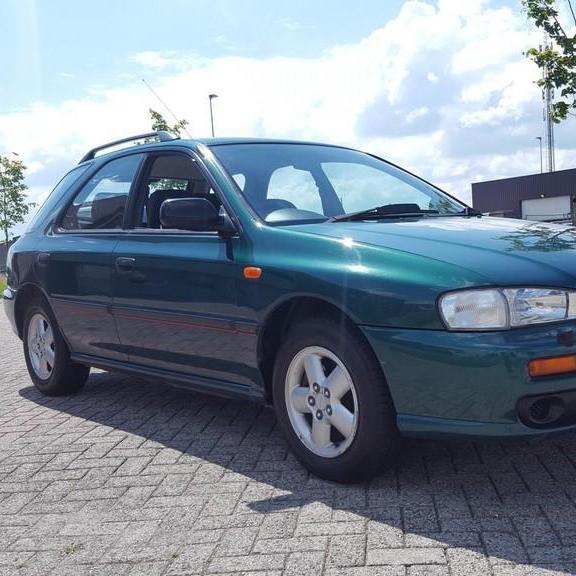
  1. Hi, my name's Adi. I'm new to Subarus, I'm originally from the Honda side of the automotive spectrum, but last year I moved to the Netherlands and happened to buy a really cheap 99 GF8 Impreza to trot about town with and got hooked on the feel of the engine and the AWD. Sadly I had to sell it because last month I moved here to the UK for work and couldn't really take it with me since the steering wheel was on the other side. Now I'm looking to get another (preferably a saloon this time) for my daily driver here so I'll probably be crawling around the marketplace hoping to find some cheap gold again. I'm gonna apologize here in advance in case I make some insultingly low offers there since my budget sadly tends to be in the triple digits (moving countries is ridiculously expensive, especially when you do it twice in a short time span)

Background Picker
Customize Layout

Account

Navigation

Search

Configure browser push notifications

Chrome (Android)
  1. Tap the lock icon next to the address bar.
  2. Tap Permissions → Notifications.
  3. Adjust your preference.
Chrome (Desktop)
  1. Click the padlock icon in the address bar.
  2. Select Site settings.
  3. Find Notifications and adjust your preference.