
Skip to content
View in the app

A better way to browse. Learn more.

Subaru Owners Club UK | Subaru Forums

A full-screen app on your home screen with push notifications, badges and more.

To install this app on iOS and iPadOS
  1. Tap the Share icon in Safari
  2. Scroll the menu and tap Add to Home Screen.
  3. Tap Add in the top-right corner.
To install this app on Android
  1. Tap the 3-dot menu (⋮) in the top-right corner of the browser.
  2. Tap Add to Home screen or Install app.
  3. Confirm by tapping Install.

SubaruWhereRU

Members
  • Joined

  • Last visited

Everything posted by SubaruWhereRU

  1. Thanks so much for this mate 🙂
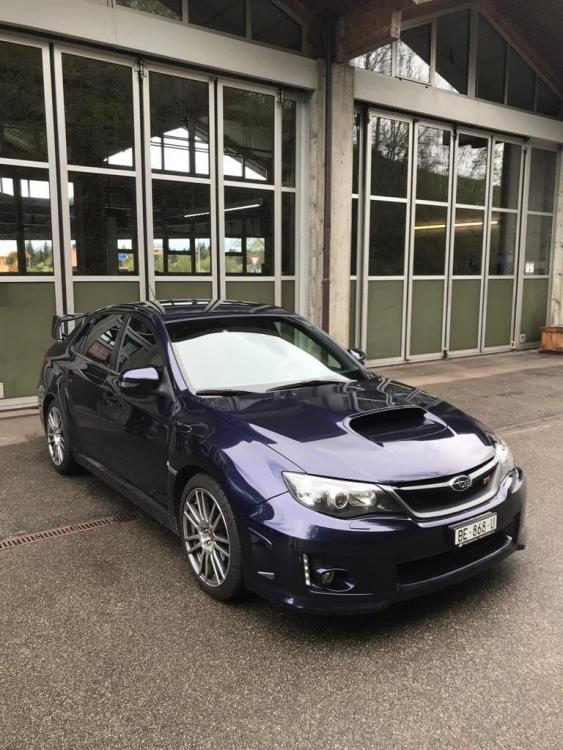
  2. Hi all, I'm a complete newbie to Subaru, the other car we have is an Audi A3 S-Line. We fancied a fun drive that we don't allow dogs, and mess inside, a little luxury and exciting to drive. We've both dreamed of owing an Impreza one day from being teenagers. I live in Switzerland now, but am British. A lot of roads around me are terribly slow, 30-50mph but I'm still excited to cruise around in my Scooby and making it to faster roads 😂 So yeah we bought a Impreza WRX STI and here she is. I bought a little plush Scooby to pop on the back shelf :) Again hello and thanks for the add. If there are any tips for looking after this beast, please let me know
Background Picker
Customize Layout

Account

Navigation

Search

Search

Configure browser push notifications

Chrome (Android)
  1. Tap the lock icon next to the address bar.
  2. Tap Permissions → Notifications.
  3. Adjust your preference.
Chrome (Desktop)
  1. Click the padlock icon in the address bar.
  2. Select Site settings.
  3. Find Notifications and adjust your preference.