
Do Not Sell My Personal Information Jump to content
View in the app

A better way to browse. Learn more.

Subaru Owners Club UK | Subaru Forums

A full-screen app on your home screen with push notifications, badges and more.

To install this app on iOS and iPadOS
  1. Tap the Share icon in Safari
  2. Scroll the menu and tap Add to Home Screen.
  3. Tap Add in the top-right corner.
To install this app on Android
  1. Tap the 3-dot menu (⋮) in the top-right corner of the browser.
  2. Tap Add to Home screen or Install app.
  3. Confirm by tapping Install.

Steve old git

Members
  • Joined

  • Last visited

Everything posted by Steve old git

  1. I can’t even find an 05 plate tailgate I’ll take any colour just fed up looking at mine 🤔
  2. No still not found out same reason my rear trim cracked and badly repaired by previous owner Subaru want silly money tempted to buy one and just resell it if it doesn’t
  3. Hi I’ve got a 55 plate legacy estate I was wondering will the tailgate from a 09 plate fit my car
  4. Not that I can find only had it a day so will have another look
  5. Hi I’ve got iPod classic cheers for help
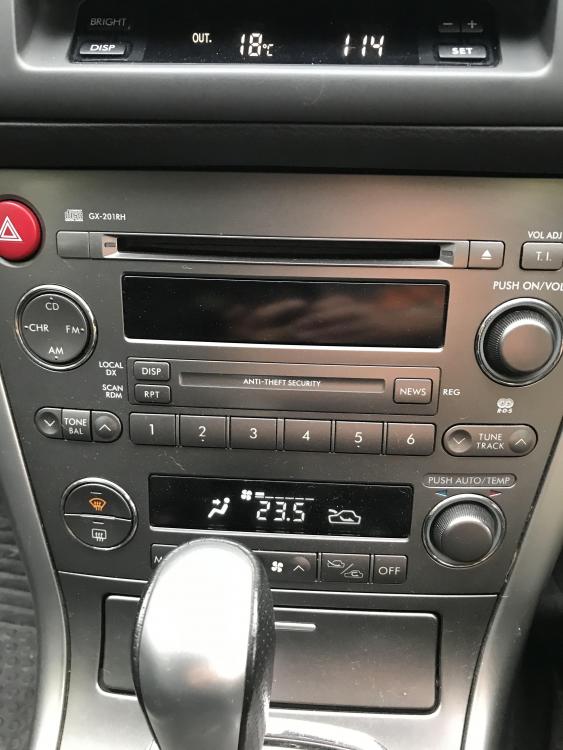
  6. Hi new here just bought 55 plate legacy was wondering if any way I can listen to my iPod in it cheers

Background Picker
Customize Layout

Account

Navigation

Search

Configure browser push notifications

Chrome (Android)
  1. Tap the lock icon next to the address bar.
  2. Tap Permissions → Notifications.
  3. Adjust your preference.
Chrome (Desktop)
  1. Click the padlock icon in the address bar.
  2. Select Site settings.
  3. Find Notifications and adjust your preference.