


Lee1971
Members
-
Joined
-
Last visited
Everything posted by Lee1971
-
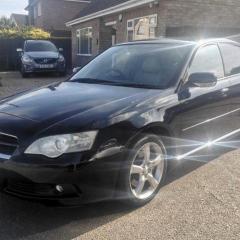 I'm really hoping I'm not the first person to come across this.... I have a 2004 JDM Legacy H6 saloon (sedan for any Americans here). On my lighting stalk I have controls for front and rear fog lights (including lights on the dash to show they are on). The rear light clusters have 2 side lights each side (top and bottom sections). Surely there must be a wire that goes to the rear lights from the fog light switch to be able to use one of those sidelight segments as a fog light? Has anyone else found this? Does anyone know what colour the rear fog light wire would be? Does anyone have any info? Thanks muchly in advance
 -
Does anyone have any experience/knowledge of the cruise control system on a Legacy BL? It’s been suggested that it’s simply a matter of adding the control stalk and connecting to the brake light switch? Any info would be greatly appreciated
