HarrisTerzo272
Members (FB)
-
Joined
-
Last visited
Everything posted by HarrisTerzo272
-
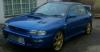
Thanks guys, I will try to get more pics up as soon as I can! Its pushing 280+ bhp at the moment. A short list of a few of the upgrades are - Original buyer also added the full prodrive package upon purchase so a little extra is always nice! FMIS upgrade (as you can see!), HKS dump valve (not like the videos on youtube this is really loud), Apexi air filter, uprated injectors (Alan Jeffrey Engineering Plymouth), full decat Ninja stainless system ( I have the cat as well!), Exedy Stage 1 clutch kit, lightened flywheel, remap (Alan Jeffrey again) ....I cant remember all of the top of my head and I really need to go through the paperwork! Since its just over 80k on the clock I am looking more towards a forged engine at the moment as it concerns me to up rate the turbo in case my engine does go bang! Any advice or links to threads would be much appreciated as I am hoping to have it sitting at 500-600bhp+ in a couple of years hence the forged engine....even if I have to remortgage ;)
-
Hi to all, I have a 98 Impreza Terzo No.272 and I love this car! I bought this car last year in June last year fortunately off an enthusiast who looked after it very well. It is quite well modified, but am looking at possible forged engine drops ;)