
Do Not Sell My Personal Information Jump to content
View in the app

A better way to browse. Learn more.

Subaru Owners Club UK | Subaru Forums

A full-screen app on your home screen with push notifications, badges and more.

To install this app on iOS and iPadOS
  1. Tap the Share icon in Safari
  2. Scroll the menu and tap Add to Home Screen.
  3. Tap Add in the top-right corner.
To install this app on Android
  1. Tap the 3-dot menu (⋮) in the top-right corner of the browser.
  2. Tap Add to Home screen or Install app.
  3. Confirm by tapping Install.

ryzee81

Members
  • Joined

  • Last visited

Everything posted by ryzee81

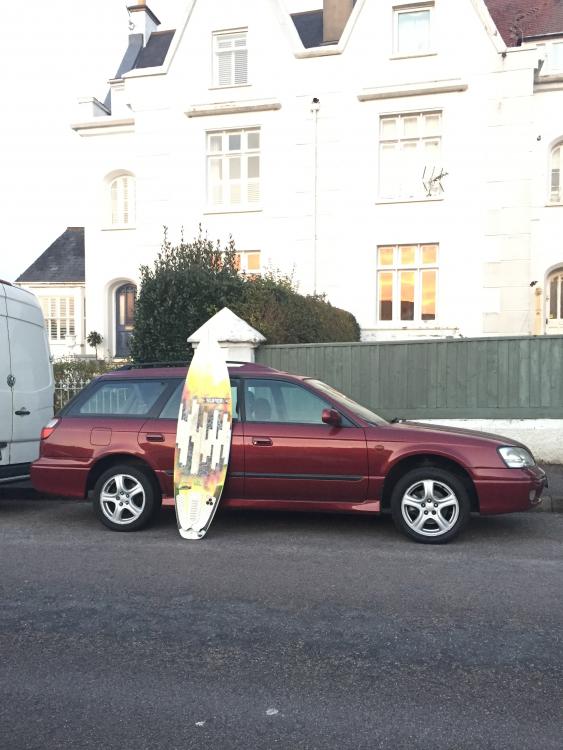
  1. Hi Guys, Thought I'd do the sociable thing and introduce myself. Just purchased a 1999 Legacy 2.5 GX wagon. Ticked all the boxes for a powerful, capable and roomy family/surf wagon, nothing else out there that matches it for the money. Really pleased so far and excited to learn more and get some decent trips under my belt. Wanted to join a decent forum so I can tap in the knowledge of all you more experienced owners out there as I'm sure it will be invaluable at some point when I need it! Based in the South West and am always at a beach on any given good surf day! Cheers All, Ryan.
Background Picker
Customize Layout

Account

Navigation

Search

Configure browser push notifications

Chrome (Android)
  1. Tap the lock icon next to the address bar.
  2. Tap Permissions → Notifications.
  3. Adjust your preference.
Chrome (Desktop)
  1. Click the padlock icon in the address bar.
  2. Select Site settings.
  3. Find Notifications and adjust your preference.