
Do Not Sell My Personal Information Jump to content
View in the app

A better way to browse. Learn more.

Subaru Owners Club UK | Subaru Forums

A full-screen app on your home screen with push notifications, badges and more.

To install this app on iOS and iPadOS
  1. Tap the Share icon in Safari
  2. Scroll the menu and tap Add to Home Screen.
  3. Tap Add in the top-right corner.
To install this app on Android
  1. Tap the 3-dot menu (⋮) in the top-right corner of the browser.
  2. Tap Add to Home screen or Install app.
  3. Confirm by tapping Install.

big red johnson

Members
  • Joined

  • Last visited

Everything posted by big red johnson

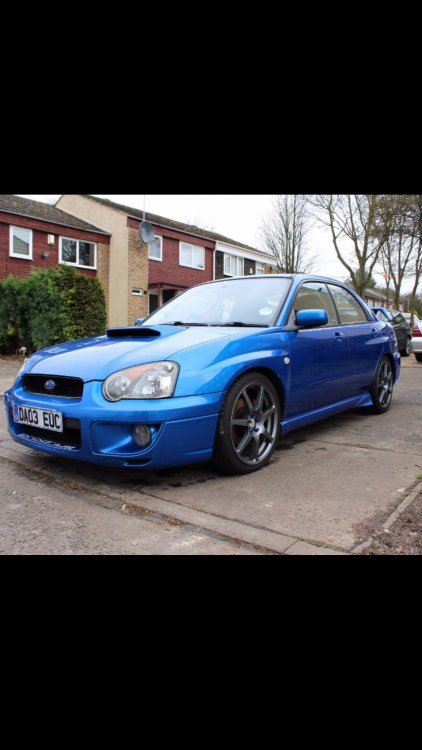
  1. Yeah it is, it was on it when I traded in the Supra for it, wasn't too sure about it as its got the Prodrive stickers on the side (the car is modded to 290bhp but t prodrive), not a fan of having stickers on the car saying its something its not, also got a prodrive graphic on the bottom of the front bumper but thats going to be removed and replaced with a matt black vinyl design in the next few weeks.
  2. Hi everyone, I am Darren, I am a former 2JZ Surpa owner and now I have a 2003 WRX blobeye which I am slowly customising as the months go on, look forward to chatting on here :)
Background Picker
Customize Layout

Configure browser push notifications

Chrome (Android)
  1. Tap the lock icon next to the address bar.
  2. Tap Permissions → Notifications.
  3. Adjust your preference.
Chrome (Desktop)
  1. Click the padlock icon in the address bar.
  2. Select Site settings.
  3. Find Notifications and adjust your preference.