January 19, 201511 yr Ouch how did that happen :( And I shouldn't worry that can still make it to the meet we will just let you park on the end ;)
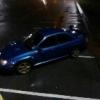
January 19, 201511 yr Author Wall accross from my house i pulled out my drive which is on a hill and my car just slid into the wall
January 19, 201511 yr :( Gutted I was expecting you to say it was rust or something lol. But I wouldn't worry to much not a big fix ;)
January 20, 201511 yr Matty has one in being broken. MB developments Unit 3 Addenbrook streetDarlastonWs10 8hjcall or tx for quicker reply 07785942237 Scooby Spares has one in 01253 871188 but not local mate :(
January 20, 201511 yr Both passanger sides look good to me mate. both in 02c blue or in other words WRC blue
January 20, 201511 yr Birmingham for the 1st one. And other is near blackpool so not just down the road :(
January 20, 201511 yr Author Ano do you have links or a number to see if they could maybe post with a decent courier
January 20, 201511 yr 07785942237 2nd 01253 871188 Both business mate so don't think they will mind being public :)
January 21, 201511 yr Could try these I know they have one in not to far but I think they're stupidly expensive Turbo Monkeys Paul Burton Unit 3, Old goods yard Spalding Road Boston Lincolnshire Pe218xl United Kingdom Phone:01205355977



Create an account or sign in to comment