Do Not Sell My Personal Information Jump to content
View in the app

A better way to browse. Learn more.

Subaru Owners Club UK | Subaru Forums

A full-screen app on your home screen with push notifications, badges and more.

To install this app on iOS and iPadOS
  1. Tap the Share icon in Safari
  2. Scroll the menu and tap Add to Home Screen.
  3. Tap Add in the top-right corner.
To install this app on Android
  1. Tap the 3-dot menu (⋮) in the top-right corner of the browser.
  2. Tap Add to Home screen or Install app.
  3. Confirm by tapping Install.

In-das Head Units

Featured Replies

Hi Guys,

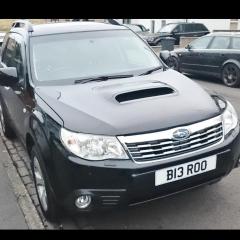
Pick up the Forester (2008 model) tomorrow and can't wait....

I  looking to replace the had unit t bring it a wee bit more up to date, does anyone know if the CLARION NX 505E (http://www.caraudiodirect.co.uk/head-units/satellite-navigation/clarion-nx505e-6-2-double-din-cd-dvd-dab-navigation-hdmi) would be compatible with the Forester.  If not has anyone else upgraded their head unit to a more modern version and if so can you recommend one?

I am also gonna upgrade the speakers, but there is plenty of choice there

Thanks

Burroo


Sorry none specific to the Forester, but a few have upgraded to Pioneer F860BT and the better F970DAB or F980DAB units with full integration to Impreza/WRX/STI.

Sent from my iPad using Tapatalk

Create an account or sign in to comment

Background Picker
Customize Layout

Account

Navigation

Search

Configure browser push notifications

Chrome (Android)
  1. Tap the lock icon next to the address bar.
  2. Tap Permissions → Notifications.
  3. Adjust your preference.
Chrome (Desktop)
  1. Click the padlock icon in the address bar.
  2. Select Site settings.
  3. Find Notifications and adjust your preference.