Do Not Sell My Personal Information Jump to content
View in the app

A better way to browse. Learn more.

Subaru Owners Club UK | Subaru Forums

A full-screen app on your home screen with push notifications, badges and more.

To install this app on iOS and iPadOS
  1. Tap the Share icon in Safari
  2. Scroll the menu and tap Add to Home Screen.
  3. Tap Add in the top-right corner.
To install this app on Android
  1. Tap the 3-dot menu (⋮) in the top-right corner of the browser.
  2. Tap Add to Home screen or Install app.
  3. Confirm by tapping Install.

Headlight modding - opinions wanted

Featured Replies

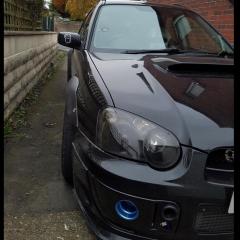
Right, as I got my last piece required to fit mini H1 projectors in my headlights I'll be doing it tomorrow. Now, currently headlights are detangoed and painted black inside (so pretty standard). I am thinking about changing the colour to white. Thing is, my car is black and I'm worried headlights will stand out a bit too much. But I have quite a few white details around (alloys, stickers) so it may not be too bad but definitely would be individual.

First picture shows them on an original car I saw and second picture shows them (badly) photoshoped to my car for an idea :D

All opinions welcome :)

2.jpg

1_1.jpg


  • Author

Nevermind, couldn't be bothered to change the colour so I am just refreshing it and it will stay black :D

20160330_105808.jpg

20160330_112142.jpg

Create an account or sign in to comment

Background Picker
Customize Layout

Account

Navigation

Search

Configure browser push notifications

Chrome (Android)
  1. Tap the lock icon next to the address bar.
  2. Tap Permissions → Notifications.
  3. Adjust your preference.
Chrome (Desktop)
  1. Click the padlock icon in the address bar.
  2. Select Site settings.
  3. Find Notifications and adjust your preference.