August 12, 20169 yr Anybody know where i can get a set of these from? I cant seem to find any. 1 was already broke but i just broke other 1 cleaning car
August 12, 20169 yr I found a set for a chap on our facebook page on Fleebay but just looked for you can't find any in the UK other than the states
August 12, 20169 yr Author Gutted i think someone in the past has glued 1 in place as its all frosted at the brake line. Never mind mihht just leave them open or maybe tint them yellow for protection
August 12, 20169 yr I'll keep an eye out for you mate I often looking about at parts But yellow is something I see a lot of people doing or Flyeye
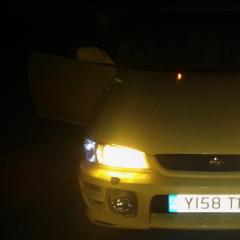
August 12, 20169 yr Author I was thinking of my doing my fogs and headlights in yellow as my car is yellow it will all match and flow. But not sure if it will look good. Might have a play over the weekend
August 12, 20169 yr best way to do it I do fond anything like this is trial and error really like I just posted up my flyeye job on what I've done to my subaru thread. Was unsure what it would look like but think it's done the desired idea to make it look more WRC looking with the headlights :)



Create an account or sign in to comment