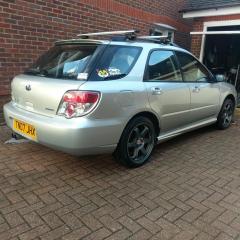
August 13, 20169 yr Looking to get some new wheels for my Hawk R Wagon and not 100% sure what the largest i can safely go without issues is. Current wheels are 5X100 15X6 ET55 with 195/60/R15 Tires. Been Using http://www.willtheyfit.com/ to see what the different will be in the rims but not sure exactly how to measure it all up on my car to see if they will fit. Been looking at some 17X7 ET40 for the front and some 17x8 ET35 for the rear, but i have a feeling they may have a bit to much poke. Would really like 17x8 ET33 all round for the Rims i have been eyeing but the front doesn't seem to accommodate this from my (Probably Incorrect) Measurements. Any help appreciated.
August 13, 20169 yr I have a blob wrx wagon but I wouldn't think fitment was different. On mine I have 18x7.5 ET35. As I have saloon front end they sit inside the arches on the front and almost flush on the back but I'm sure I'd be able to fit an inch wider set with the same offset.
August 14, 20169 yr Author I imagine its the same fitment at the rear. What size tires you running, Not worried about the poke as long as the tread fits under the arches. How much wider is the Saloon front to the wagon front?
August 14, 20169 yr My tyres are 225/40, not sure how much wider is it, I bought it already like that but I'd say probably an inch maybe inch and a half per side.
August 17, 20169 yr Author Thanks for the help, I'll see if i can "Try some on" before i buy anything but i'm sure what i want will fit.



Create an account or sign in to comment