Do Not Sell My Personal Information Jump to content
View in the app

A better way to browse. Learn more.

Subaru Owners Club UK | Subaru Forums

A full-screen app on your home screen with push notifications, badges and more.

To install this app on iOS and iPadOS
  1. Tap the Share icon in Safari
  2. Scroll the menu and tap Add to Home Screen.
  3. Tap Add in the top-right corner.
To install this app on Android
  1. Tap the 3-dot menu (⋮) in the top-right corner of the browser.
  2. Tap Add to Home screen or Install app.
  3. Confirm by tapping Install.

What I am doing now

Featured Replies

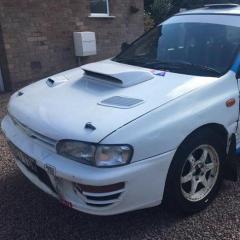
Not sure if this is allowed so if not let me apologise now and sorry Admin......

Having got my Subaru Rally Car I have formed a relationship with API IMPREZA  (also API ENGINES) who are real experts in anything Subaru.  From general servicing, engine builds to bespoke car builds these are the boys.  Feel free to contact Simon on 07979 955040.  really helpful guy.  They are based in Long Itchington which is just South of Coventry.  They ship worldwide.


Create an account or sign in to comment

Background Picker
Customize Layout

Account

Navigation

Search

Configure browser push notifications

Chrome (Android)
  1. Tap the lock icon next to the address bar.
  2. Tap Permissions → Notifications.
  3. Adjust your preference.
Chrome (Desktop)
  1. Click the padlock icon in the address bar.
  2. Select Site settings.
  3. Find Notifications and adjust your preference.