Do Not Sell My Personal Information Jump to content
View in the app

A better way to browse. Learn more.

Subaru Owners Club UK | Subaru Forums

A full-screen app on your home screen with push notifications, badges and more.

To install this app on iOS and iPadOS
  1. Tap the Share icon in Safari
  2. Scroll the menu and tap Add to Home Screen.
  3. Tap Add in the top-right corner.
To install this app on Android
  1. Tap the 3-dot menu (⋮) in the top-right corner of the browser.
  2. Tap Add to Home screen or Install app.
  3. Confirm by tapping Install.

Newbie from wirral

Featured Replies

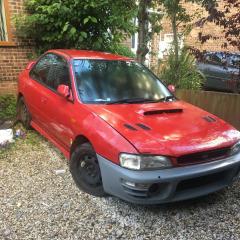
Hi all just bought an Impreza classic project, I've had one before and loved it but almost it through no fault of my pen and ever since wanted another. It's a uk2000 the dash has been stripped out by previous owner because head gasket had gone and he was gonna break it. He was about to take the loom out for a customer only to realise it was different to an import one? That's his story anyway so now am left with putting dash back together (with no original bolts unless someone can help me out with this?) and gotta try an source a centre console as he ripped it out an broke it then do either a head gasket or engine swap. I bought an engine of him aswell without realising it's different as it has the coil packs on the plugs rather then on the top. 

IMG_0611.JPG

IMG_0612.JPG

IMG_0613.JPG

IMG_0614.JPG


Create an account or sign in to comment


Background Picker
Customize Layout

Account

Navigation

Search

Configure browser push notifications

Chrome (Android)
  1. Tap the lock icon next to the address bar.
  2. Tap Permissions → Notifications.
  3. Adjust your preference.
Chrome (Desktop)
  1. Click the padlock icon in the address bar.
  2. Select Site settings.
  3. Find Notifications and adjust your preference.