Do Not Sell My Personal Information Jump to content
View in the app

A better way to browse. Learn more.

Subaru Owners Club UK | Subaru Forums

A full-screen app on your home screen with push notifications, badges and more.

To install this app on iOS and iPadOS
  1. Tap the Share icon in Safari
  2. Scroll the menu and tap Add to Home Screen.
  3. Tap Add in the top-right corner.
To install this app on Android
  1. Tap the 3-dot menu (⋮) in the top-right corner of the browser.
  2. Tap Add to Home screen or Install app.
  3. Confirm by tapping Install.

Featured Replies

I am going to Bonus Ball these wheels...

59 Balls (1 to 59) at £10 each...

£400 for myself for the wheels and the remainder will go to charity...

Once all the Balls have been sold (£10's transferred to me by paypal), the next Bonus Ball drawn on a Saturday will be the winning Ball and whoever has that number will win the wheels and will get them within a couple of days (inc. free postage)...

If you would like a go, email me at:     [email protected]
which ball you would like and i will FWD details of my paypal payment info and let you know if that ball is still available, whoever picks a Ball Number first will get that number, once a ball goes i will keep updating a list of who has which ball until all the balls have gone...

Your Prize :

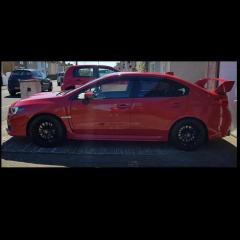
Set of Four 18" Enkei Dark Gun Metallic Alloys (from a 2017 Subaru WRX STI)

Thanks and Good Luck
😎🍷👍👍👍

Screenshot_20171012-133002.png


Create an account or sign in to comment


Background Picker
Customize Layout

Configure browser push notifications

Chrome (Android)
  1. Tap the lock icon next to the address bar.
  2. Tap Permissions → Notifications.
  3. Adjust your preference.
Chrome (Desktop)
  1. Click the padlock icon in the address bar.
  2. Select Site settings.
  3. Find Notifications and adjust your preference.