Do Not Sell My Personal Information Jump to content
View in the app

A better way to browse. Learn more.

Subaru Owners Club UK | Subaru Forums

A full-screen app on your home screen with push notifications, badges and more.

To install this app on iOS and iPadOS
  1. Tap the Share icon in Safari
  2. Scroll the menu and tap Add to Home Screen.
  3. Tap Add in the top-right corner.
To install this app on Android
  1. Tap the 3-dot menu (⋮) in the top-right corner of the browser.
  2. Tap Add to Home screen or Install app.
  3. Confirm by tapping Install.

LonelyDriver

Members
  • Joined

  • Last visited

Everything posted by LonelyDriver

  1. Well it was on a boat for about two months! I can wait a bit longer to make sure it's prepared right. Keeping it stock spec (specifically sought out a near-standard example) but treating it to new gearbox bushes, air filter, OEM spec Brembo discs/pads all-round and Turanza T005s.
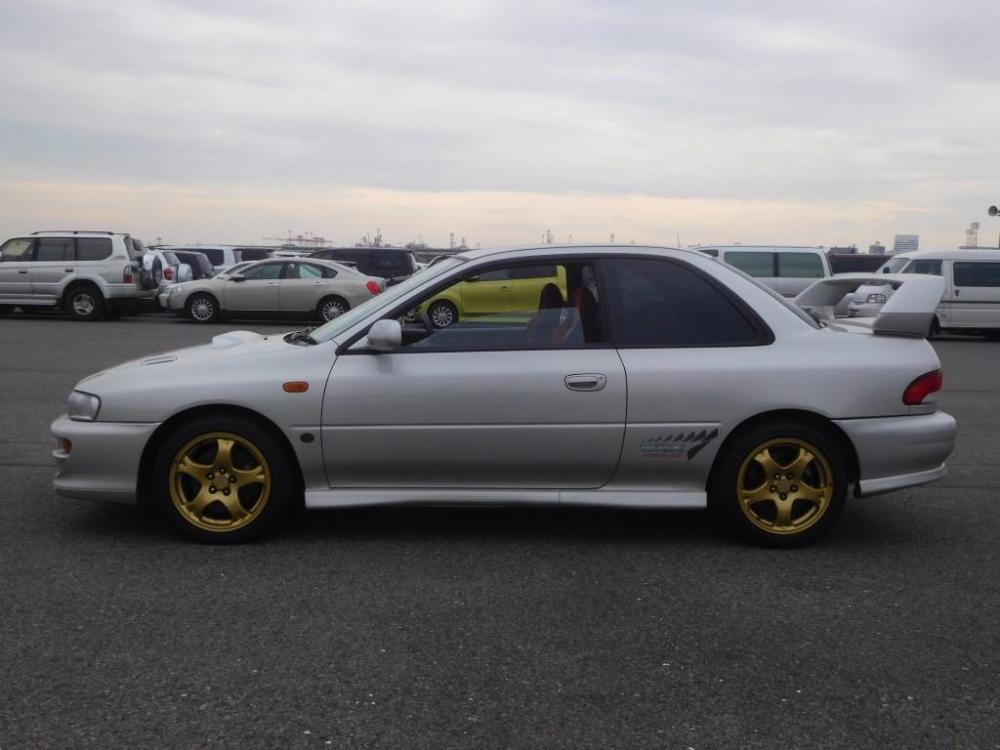
  2. Hi All With the help of an importer I will soon be the owner of a GC8 WRX type R STi Version V. It has been a dream of mine for quite a while to own a Classic Impreza and this particular version featured in Initial D; some of you may be familiar. Being able to combine multiple passions in the form of this car for a (relatively) low price is a goal I have been working toward for the past three years. It is a pleasure to be here.
Background Picker
Customize Layout

Account

Navigation

Search

Configure browser push notifications

Chrome (Android)
  1. Tap the lock icon next to the address bar.
  2. Tap Permissions → Notifications.
  3. Adjust your preference.
Chrome (Desktop)
  1. Click the padlock icon in the address bar.
  2. Select Site settings.
  3. Find Notifications and adjust your preference.