


Jammy Johnny
Members
-
Joined
-
Last visited
Everything posted by Jammy Johnny
-
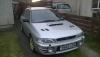
here is a bigger photo, right hand wing needs repaired and a couple of bit need welding under rear bumper but the sills are solid. Only problem I have is when trying to drive slow, the car chugs a little when changing in to 2nd gear.
-
cheers for the welcome ;) Only the little image on my avatar. I will take some pics when its not bucketing down with rain. Its got a k/n panel filter but thats all I know so far. I will get a better look at it at work on Monday. I will stick it on the 2 poster ramp and get a good look underneath. I dont think the car has an OBDII socket ( 08/97 model) but is there any sockets to connect our Launch diagnostic computer too? we have the full set with various fittings that we have never needed to use on any cars we get in.
-
Hi, Im a Newbie to the forum and Just bought my first Impreza. Its an older model Impreza Turbo 2000 Awd. Im going to keep her standard, but to do this I am going to have to replace the decatted stainless steel exhaust with an original exhaust. Well thats my intro and I hope to do a few more posts over time. Johnny.

