January 28, 201511 yr Hi guys, bought some Supertones today to replace the stock horns. Went to fit them behind the grill, but in front of the rad there's a pipe, I think from power steering. It's stopping me from fitting one of the horns. Can I remove it or move it? Any ideas? Cheers
January 28, 201511 yr There's a fitting guide on here, think it's for a hatch but I'll dig it out and post it up. Failing that gambit has done his so may be worth asking him
January 28, 201511 yr Stupid tapatalk won't let me pull the link from the how to guide section, grrrr
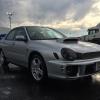
January 29, 201511 yr I've spoke to him via PM it's the power steering cooler Pipe I'll post the pictures when I get chance here I just put the bracket through the two pipes and pushed it back slightly. I also just bridged the two horns on both Blobeye and Bugeye without running stuff back to the battery or using the resistor provided. Shame didn't ask before I had the full front end off the Monday :(
January 29, 201511 yr No worries mate I'd started to get mad I was using tapatalk to upload straight here but it kept crashing on the 2nd picture :)



Create an account or sign in to comment