Do Not Sell My Personal Information Jump to content
View in the app

A better way to browse. Learn more.

Subaru Owners Club UK | Subaru Forums

A full-screen app on your home screen with push notifications, badges and more.

To install this app on iOS and iPadOS
  1. Tap the Share icon in Safari
  2. Scroll the menu and tap Add to Home Screen.
  3. Tap Add in the top-right corner.
To install this app on Android
  1. Tap the 3-dot menu (⋮) in the top-right corner of the browser.
  2. Tap Add to Home screen or Install app.
  3. Confirm by tapping Install.

Custom Gel Overlays

Featured Replies

Anybody no where I can can custom hel overlays for front rear n alloys

Sent from my SM-G920F using Tapatalk


  • Author

Meant to say gel not hel stupid phone

Do you know or have a picture of what you want mate I do know someone who can do them cheap for S.O.C members ;) 

  • Author

Basically want a black background with red subaru logo if that helps

Sent from my SM-G920F using Tapatalk

  • Author

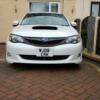
post-5206-145106441842_thumb.jpg

Sent from my SM-G920F using Tapatalk


Yep pretty sure he can do that. You was it exactly the same ?

  • Author

Yh if possible

Sent from my SM-G920F using Tapatalk

  • Author

N one for steering wheel if possible

Sent from my SM-G920F using Tapatalk

He will ask me for sizes so if you can get them for me too. I'll get a price he did sparkey badge's for his 2015 impreza.

  • Author

Ok no worries be 2moz before I can get sizes

Sent from my SM-G920F using Tapatalk


No worries mate just pm me if you like but I'd say he won't get them done for few days if he's going back before the new year.

  • Author

Sound will do not not in a rush so all gd

Sent from my SM-G920F using Tapatalk

Create an account or sign in to comment


Background Picker
Customize Layout

Account

Navigation

Search

Configure browser push notifications

Chrome (Android)
  1. Tap the lock icon next to the address bar.
  2. Tap Permissions → Notifications.
  3. Adjust your preference.
Chrome (Desktop)
  1. Click the padlock icon in the address bar.
  2. Select Site settings.
  3. Find Notifications and adjust your preference.