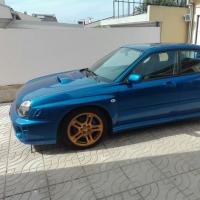
September 20, 20169 yr Hi... Im looking for the front and back lips from the pictures bellow for my subaru... I want to remove the front fog lights and mont the pieces on the picture... Can anyone tell me were i can buy this parts?? Enviado do meu ALE-L21 através de Tapatalk
September 20, 20169 yr Can ask these they're good company see what postage is. http://www.abwmotorsport.co.uk/bugeye-impreza Only other place I have found is here http://www.forcewerkz.com/2002-2003-subaru-impreza-wrx-bugeye-cs-brake-ducts-fog-light-inserts-covers/
September 24, 20169 yr if you dont mind inporting from japan then these have the brake ducts. https://www.japanparts.com/parts/detail/22012 carbon brake duct https://www.japanparts.com/parts/detail/22013 FRP brake duct



Create an account or sign in to comment