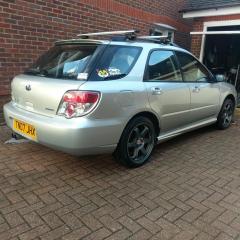
November 20, 20169 yr Just wondering if it was possible to change the Boot spoilers on the wagons. I've had a look at removing this one but cant see how its done. There are no obvious bolt hole and was wondering if it's just stuck on instead. I would like to put a WRX one on if possible. Any Info guys?
November 20, 20169 yr Mines a lot older than yours, so could possibly be different. I have two tabs on the top of the spoiler i need to prize off, and there are some clips and things on the inside of the boot i need to undo.
November 21, 20169 yr Author Mine doesn't have any tabs on the top and there are no immediately obvious fixings in the boot. Looks like its either glued on, or uses hidden clips/fixings. Trouble is i don't want to force it off and not get it back on or break it.
November 21, 20169 yr the screws-bolts are usually inside the hatch,take trim off inside and their is usually holes just big enough to get a socket in sould be in their,thats were they was on my bug wagon,when you screw them out dont drop them inside door can be a right ba****d to get back out,their was 4 bolts holding mine on but that was a bit bigger spoiler.
December 11, 20169 yr Author I'll have a look next time i have a free dry weekend, it would be nice to be able to change it if i can.



Create an account or sign in to comment