Do Not Sell My Personal Information Jump to content
View in the app

A better way to browse. Learn more.

Subaru Owners Club UK | Subaru Forums

A full-screen app on your home screen with push notifications, badges and more.

To install this app on iOS and iPadOS
  1. Tap the Share icon in Safari
  2. Scroll the menu and tap Add to Home Screen.
  3. Tap Add in the top-right corner.
To install this app on Android
  1. Tap the 3-dot menu (ā‹®) in the top-right corner of the browser.
  2. Tap Add to Home screen or Install app.
  3. Confirm by tapping Install.

Featured Replies

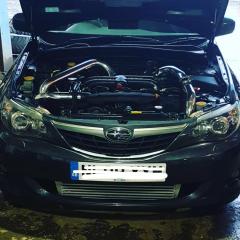
Morning gents, new to the Subaru game so go easy on me šŸ˜‚ I’ve got an 08 wrx hatchback with a few upgrades done by myself... running 363/402 mapped by Andy Forrest. I’m gong toĀ forge the engine later this year and I’m looking to fit an sti inlet manifold. Does anyone around the Halifax/westĀ Yorkshire area have an sti hatchback they’d let me have a butchers underĀ the hood at so I can gauge wether it’s gonna be a tw*t or not. Quite happy to travel about. TIAĀ 

E5786C67-8BD8-4377-92A2-1CC06BB110B1.jpeg


Create an account or sign in to comment


Background Picker
Customize Layout

Configure browser push notifications

Chrome (Android)
  1. Tap the lock icon next to the address bar.
  2. Tap Permissions → Notifications.
  3. Adjust your preference.
Chrome (Desktop)
  1. Click the padlock icon in the address bar.
  2. Select Site settings.
  3. Find Notifications and adjust your preference.