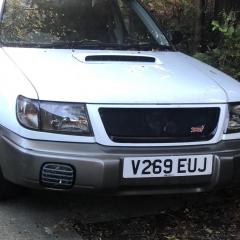
October 25, 20205 yr My 01 Impreza sport special edition in cashmere yellow. Full Cusco suspension and Cusco strut braces front and rear both upper and lower. Carbon wrapped boot, roof, bonnet and grill, version 4 StI spoiler, stainless headers then straight through piped with a hks super dragger rear box. Owned for around 8 years with no More major mods planned. My 99 Forester Turbo S in split met grey and white. STI version 4 engine, STI version 1 5 speed gearbox, rear diff, shafts and hubs, all from an RA I believe.? Custom front grill, TEIN street master coil overs, STI version 3 Momo steering wheel, short shifter, flocked interior sitting on 19x9.5 replica oz super turismo alloys in dark bronze. Full stainless steel ninja turbo back exhaust, non resonated with decat. Owned for around 6 weeks now, bought bog standard from an elderly gentleman who had it from new. Plans for lower lip front and rear, side skirts, spoiler extension and possibly a custom wide arch kit. I’m also planning on doing headers, up pipe and change the exhaust, the system that is on were a spare parts I had laying around.



Create an account or sign in to comment