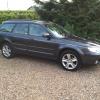
June 26, 201411 yr Hiya, After a few alternative ideas. My wheels are in need of a refurb really amd am thinking of going graphite grey almost matching the body or a satin black?? Any other ideas?? Also was going to clean up the calipers while the wheels are off. Not sure if subaru had a specific colour or if it is just a choice? Thinking silver/gold or red. Again any ideas? Pic below to give an idea of colour
June 27, 201411 yr Nice car, I like the scoop. I'd like a bonnet like that :) If it was my car, I'd either leave the alloys as they are or buy a set of 17's. - Although, I'd imagine 16's would be better in the winter/snow. I looked at painting my calipers too, decided that I'm going to paint them either a matt or gloss black. I think that if I was to paint them a bright eye catching colour it would only highlight my stock brakes lol.
June 27, 201411 yr Author Yeah would like some new wheels but they are a bit down on the list :-( Black is another option lol. I'm more inclined to silver/gold if I went dark on the wheels. Am going to steer clear of red I think for that reason. Different if they were brembos lol This is the daily car unfortunately so couldn't wait for them to be dipped. Again would look nice with some bigger brakes :-)



Create an account or sign in to comment