
Do Not Sell My Personal Information Jump to content
View in the app

A better way to browse. Learn more.

Subaru Owners Club UK | Subaru Forums

A full-screen app on your home screen with push notifications, badges and more.

To install this app on iOS and iPadOS
  1. Tap the Share icon in Safari
  2. Scroll the menu and tap Add to Home Screen.
  3. Tap Add in the top-right corner.
To install this app on Android
  1. Tap the 3-dot menu (⋮) in the top-right corner of the browser.
  2. Tap Add to Home screen or Install app.
  3. Confirm by tapping Install.

Braders1984

Members
  • Joined

  • Last visited

  1. Thanks guys, I've got myself booked in for a ecutek mapping at the end of July so hopefully get some more juice out of the leggy with that.
  2. Hi again Is it possible to get the typical boxer rumble out of a 2005 JDM BP5 legacy auto? Also what's the first port of call for more power? Thanks.
  3. Braders1984 changed their profile photo
  4. Yeah tried that mate and it wouldn't quite pick it up on Google translate. Bummer ey.
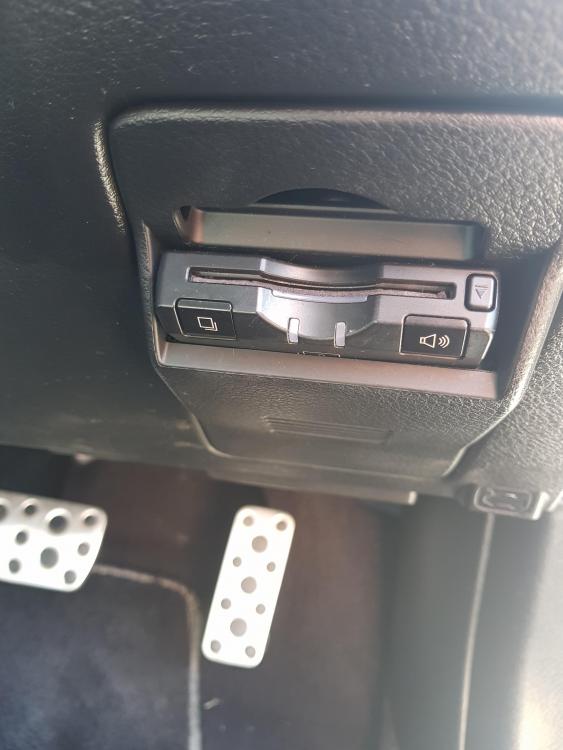
  5. Hi all. Just bought myself a JDM Legacy twin scroll, I've been wanting one for years and I'm totally in love with her. Anyway there is some girl shouting Japanese at me on start up. I've found where it's coming from but does anyone know what it does or what she says? It comes from this box. It will fit a bank card into it. Thanks.
Background Picker
Customize Layout

Configure browser push notifications

Chrome (Android)
  1. Tap the lock icon next to the address bar.
  2. Tap Permissions → Notifications.
  3. Adjust your preference.
Chrome (Desktop)
  1. Click the padlock icon in the address bar.
  2. Select Site settings.
  3. Find Notifications and adjust your preference.