


ByPrOdUcT
Members
-
Joined
-
Last visited
-
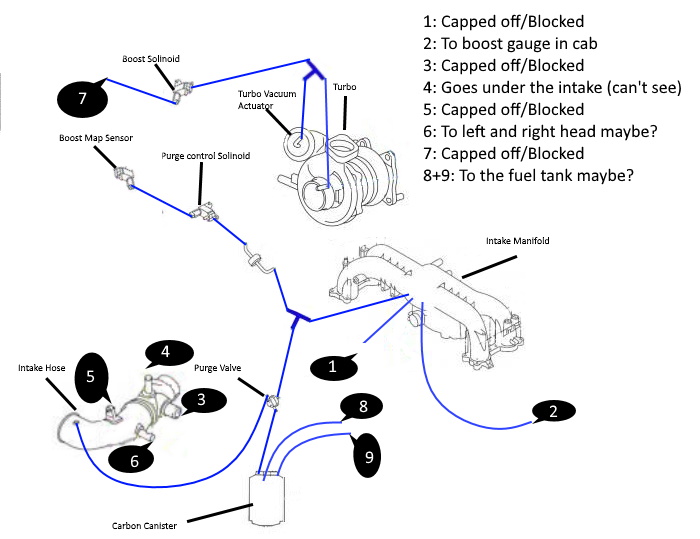
I made an easier to read and hopefully better diagram I think that I need to do the this but not 100% sure 5 goes to 7; 3 should go to the return on the "BOV"; 1 should go to the vacuum for the "BOV"
-
Hello I "inherited" an unfinished project '99 Turbo 2000 Impreza car that I have been putting back together for the last year and with the help of so many forum i have manged to get her almost starting. I have put her back together to the best of my ability and google knowledge but am now stuck with the vacuum/intake piping that i can't figure out. I have taken a bunch of picture and created a "diagram" and would really appreciate some help if anyone could please. There are a few pipes that go nowhere and some that look like they should be connected to something but aren't. In the image Blue lines are the vacuum lines #1: Not sure where it goes, think it goes to the fuel tank #2: Not sure where it goes #3: Capped off (blocked) #4: Not connected #5: Not connected on either end #6: Capped off (blocked) I can't find a diagram for my exact model, only some bits of each diagram being simpler. I couldn't get the image to upload in any format other than PDF, sorry. exploded.pdf
