Sc00by1994
Members
-
Joined
-
Last visited
-
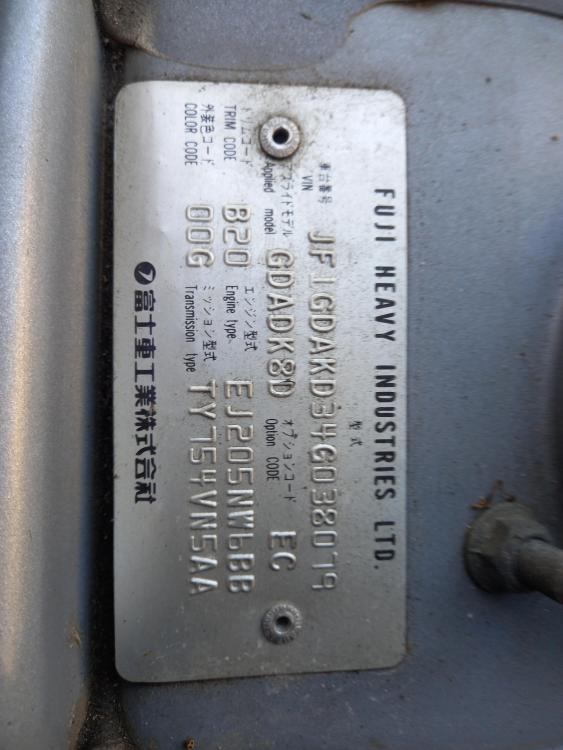
Hi all, Just wondering if anyone can tell me why my paint code says 00G, I can't find this paint code anywhere. Am I missing something?
-
Sc00by1994 changed their profile photo
-
-
It's okay as MP Rachel Maclean said we could always go and get higher paid jobs haha 😄
-
Yeah it's pretty crazy right now filled up today £2.05/L 😳
-
yeah they were really good. Turns out the refurbished part I got didn't work either 🙄 thanks for the help
-
Hi David, Thanks for the reply I have tried cleaning, but no luck. The IACV was a refurbished part (new gasket obviously). Maybe TPS like your saying, but voltages don't look to far off. I'm taking the Impreza to Triton Motorsport today to have a look, so fingers crossed. Thanks again
-
Hi, I was wondering if anyone can help with my 2004 Impreza. I recently took the throttle body off to clean it. Now when starting it idles high at 2500RPM and doesn't drop, I also have a trouble code P0519 for IACV performance. I have checked the wiring all looks good and I have replaced the IACV. I've also replaced the gasket for IACV and throttle body. I also can't find any vacuum leaks. Any help would be massively appreciated! Thanks, Chris