
Do Not Sell My Personal Information Jump to content
View in the app

A better way to browse. Learn more.

Subaru Owners Club UK | Subaru Forums

A full-screen app on your home screen with push notifications, badges and more.

To install this app on iOS and iPadOS
  1. Tap the Share icon in Safari
  2. Scroll the menu and tap Add to Home Screen.
  3. Tap Add in the top-right corner.
To install this app on Android
  1. Tap the 3-dot menu (⋮) in the top-right corner of the browser.
  2. Tap Add to Home screen or Install app.
  3. Confirm by tapping Install.

Gez83

Members
  • Joined

  • Last visited

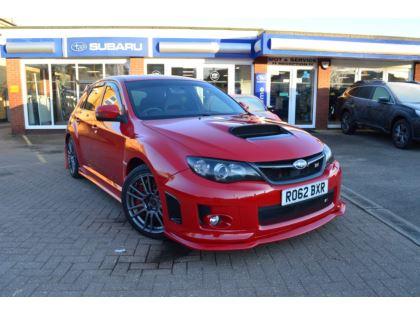
  1. Hi there, recently acquired my first Subaru. Always had a hankering for jap sports cars with previously owning a celica gt4, mk4 supra tt and a Mitsubishi evo 8. Really enjoying the driving experience so far but I am unsure of the mods that have previously been installed. It appears to have had a 340 upgrade from Subaru themselves but I also have receipts and a rolling road printout from a ecutek remap which is quite recent showing 352 bhp. don’t know if anyone knows the car that could shed some light but hi all anyway.
Background Picker
Customize Layout

Configure browser push notifications

Chrome (Android)
  1. Tap the lock icon next to the address bar.
  2. Tap Permissions → Notifications.
  3. Adjust your preference.
Chrome (Desktop)
  1. Click the padlock icon in the address bar.
  2. Select Site settings.
  3. Find Notifications and adjust your preference.