SOC Admin
Administrators
-
Joined
-
Last visited
Everything posted by SOC Admin
-
-
-
-
-
-
-
-
-
-
-
-
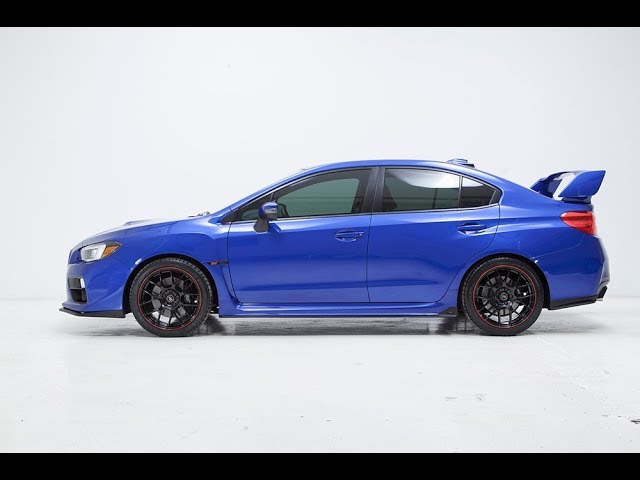
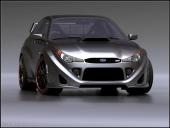
The Subaru Impreza has an image problem. While its name has connotations of lairy wings, bonnet scoops and gold alloy wheels, in recent years it’s been transformed into a sensible Toyota Auris rival Subaru has grown up but admits it has a “rally hangover” to get over. It wants to be seen as a forerunner in safety technology, known for its no-nonsense four-wheel drives and a spiritual replacement for Land Rover now that the British brand has moved upmarket. It’s more Volvo than hot hatch. While the Impreza name badge might be Subaru’s best known, it accounts for a tiny part of the firm’s sales in Europe – the Outback, Forester and XV all sell in bigger numbers here. The new 2018 model is based on an all new platform, set to underpin more Subaru models in the future. Just two powertrains will be coming to the UK in the first instance: 1.6-litre and 2.0-litre petrol boxer engines, both paired with a CVT Lineartronic transmission and four-wheel-drive. First impressions Bland from some angles and plain ugly from others, it’d be a stretch to describe the new Impreza as attractive, in our eyes. Typically Japanese in its approach, the Impreza is lower, wider and longer than before, giving it a more conventional appearance than its almost MPV-esque predecessor. It’ll be available in a choice of six colours in the UK: the standard white, while the rest are available for £550 – the only optional extra available from the factory. Most buyers won’t be too fussed about the Impreza’s colour or design, however. They’ll care more about how safe it is. It’s scored record-breaking results in Japanese crash tests, thanks in part to a 40 percent increase in body strength as well as a host of innovative safety systems. One of which is Eyesight, which made its debut on the Subaru Outback. This acts as, ahem, a second pair of eyes for the driver, monitoring other vehicles, pedestrians and lane markings. It consists of a range of tech to help avoid or reduce the severity of a collision, including: lane keep assist, a mildly annoying lane departure warning and pre-collision braking. This all do largely as they say on the tin. Another clever feature is the pre-collision throttle management which, if you’re parked and go on the accelerator towards a wall or another car, will cut the gas and ask if you really want to drive forwards into said wall or car. First seat While it’d be a push to describe the new Impreza’s interior as ‘premium’, it’s certainly a significant step up from the outgoing model. Typical Subaru buyers want an interior that can cope with wet dogs and muddy wellies, so will forego soft-touch materials in favour of an interior that will stand up to a bit of abuse. Having said that, there are more soft-touch plastics than before, and there’s certainly plenty of kit. An eight-inch infotainment screen dominates the dash, offering Android Auto and Apple CarPlay as well as a DAB radio. It’s worth noting that there’s no sat nav as standard – indeed, you can’t even pay extra for one. Subaru reckons sat navs are a thing of the past; why would you want to pay £1,500 for a bit of kit that will soon get updated, when your phone will do a better job? You can’t spec leather seats, either, but the heated fabric front seats are perfectly comfortable, while those in the back are unlikely to complain about a lack of space. Practicality is something the new Impreza does very well: the 385-litre boot is decent, while access is easy. If you’re looking to transport bulky objects, the rear seats do fold down 60/40, but not entirely flat. First drive We mentioned the two engine choices available in the new Impreza in the UK. The entry-level 1.6-litre provides a meagre 114hp… it’s adequate around town, but soon starts to feel strained at higher speeds, hampered in part by the CVT transmission. If the majority of your miles are below around 40mph, it’ll be fine – it’s smooth to drive, with little vibration through the pedals or steering wheel. We’d opt for the larger 2.0-litre, however. For an extra £1,000, you get 156hp and paddles to mimic conventional gear ratios. While still vocal when pushed, it’s much happier accelerating towards motorway speeds. Although Subaru admits that it’d be nice to offer a manual option, the CVT is necessary for its complex EyeSight system to work. We suspect that the chassis is excellent, but neither powertrain really does it justice. The majority of its customers like four-wheel-drive for the extra security it offers in all conditions, says Subaru, not necessarily because they want to drive fast on twisty roads or even venture far off road. The steering is fine – nicely weighted – and the suspension does a commendable job of soaking up lumps and bumps. Economy wise, the Impreza is acceptable, no more. The 1.6-litre returns a combined 44.1mpg, dropping to 42.8mpg for the 2.0-litre (a sacrifice worth making, in our opinion). That equates to 145g/km and 152g/km CO2. No diesel or front-wheel-drive models make it a difficult choice for fleet users, a market Subaru probably ought to be tapping into if it wants to extend beyond its current niche. First verdict The 2018 Subaru Impreza is fundamentally a good car. You get the impression that a lot of time, money and effort has gone into engineering it to be safe and last longer than a rival European hatchback. Subaru customers are very loyal, and we can see why they’d trade their old Impreza in for a new one. It’s much better than its predecessor. The interior is a marked improvement, while the drive is safe if a tad unrewarding. Attracting new customers to the brand might be where it’ll struggle, however. The powertrains let it down, not offering the choice of competitors. It’s not particularly good in any area, either, unless you really want four-wheel-drive and Subaru’s EyeSight safety system. Whether the Impreza is a success will come down to the price. Starting at £23,995 for the 1.6 (the 2.0-litre is £24,995), it’s getting close to the equivalent BMW 1 Series and Audi A3. Sounds like Subaru’s shot itself in the foot? Let’s not jump the gun just yet. It’ll come down to finance deals, because that’s how most of us buy new cars. We’re yet to find out how much it’ll cost each month but, unless it’s surprisingly cheap, we suspect only a loyal few will part with their cash for the new Impreza. Star rating verdict: ★★★☆☆ Five rivals Honda Civic Mazda 3 Toyota Auris Citroen C4 Cactus Ford Focus Prices Subaru Impreza 1.6 SE Lineartronic £23,995 Subaru Impreza 2.0 SE Lineartronic £24,995 In pictures: 2018 Subaru Impreza
-
-
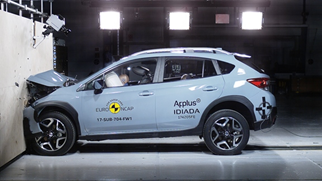
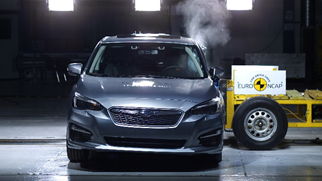
· All-new Subaru XV and Impreza achieved maximum five star overall rating in the Euro NCAP safety test · Subaru awarded for the 6th consecutive time*1 the maximum five star rating from Euro NCAP · Both Subaru XV and Impreza performed the best score ever for Subaru in the Adult Occupant Protection*2 and Pedestrian Protection*3 Euro NCAP tests Subaru UK recently announced that the all-new Subaru XV and Impreza models (European specs.) have each achieved the maximum five star overall rating in the 2017 European New Car Assessment Programme (Euro NCAP)*4 safety performance test. The new Subaru XV and Impreza models achieved outstanding scores in all four assessment areas (Adult Occupant, Child Occupant, Pedestrian Protection, Safety Assist), well above the minimum threshold required and with noticeable high overall average. The all-new Subaru XV and Impreza are the first models to feature the new Subaru Global Platform (SGP), designed to deliver higher levels of safety performance, driving enjoyment and ride comfort. The SGP brings significant enhancement to the body and chassis rigidity (front lateral flexural rigidity +90%, torsional rigidity +70%, front suspension rigidity +70%, rear sub frame rigidity +100%) and impact energy absorption is improved by 40% over present models. Both XV and Impreza models are equipped with 7 airbags, including one SRS knee airbag installed for the driver's seat, and a revised seatbelt equipped with a locking tongue reducing injury levels and better protecting all passengers in case of collision. Subaru’ EyeSight Driver Assist technology is fitted as standard on both all-new Subaru XV and Impreza, which achieved very good performance in the Autonomous Emergency Braking at Euro NCAP test with cars and pedestrians. The EyeSight Driver Assist technology is a set of two digital stereo cameras that monitor the traffic movement to warn the driver of a threat ahead and to apply pre-collision braking in emergency situations, in order to avoid or at least to mitigate the collision. The EyeSight system also ensures the lateral support functions, warning the driver of unintentional lane departure and assisting the driver in keeping the travelling lane. “We are very pleased that the Euro NCAP has recognized the new Subaru XV and Impreza with 5 star rating in their recent tests”, said Masamichi Kudo, President and CEO of Subaru Europe. “Safety is the core value Subaru provides to customers and we are proud to have been endorsed all over the world with outstanding safety recognitions for both new models, and now also in Europe. This marks the 6th time in a row when Subaru has been honored with the prestigious five star rating from Euro NCAP following the 2009 rating for the Legacy, 2011 Subaru XV, 2012 Forester, 2014 Outback, and 2016 Levorg”. The all-new Subaru XV and Impreza received prestigious recognition on the safety performance at a global level. Both new models (Japanese specs.) won 3 awards in the Japan New Car Assessment Program (JNCAP) crash safety evaluation tests conducted by the Ministry of Land, Infrastructure, Transport and Tourism (MLIT) and the National Agency for Automotive Safety and Victim’s Aid (NASVA). Firstly, both new models received an award for reaching 5 star safety ranking. Secondly, they won the 2016-2017 Grand Prix Award for earning the highest safety score ever score of 199.7 of maximum 208 points. Lastly, the two new models received the Special Award for having a pedestrian protection airbag as standard (in Japan). After their launch in USA, both the Subaru XV and Impreza (American specs.) received the 2017 TOP SAFETY PICK+ award from the Insurance Institute for Highway Safety (IIHS), an independent, nonprofit scientific and educational organization dedicated to reducing the losses–deaths, injuries and property damage–from crashes on the nation's roads. *1: On the models tested between 2009-2017 2*Subaru XV and Impreza Adult Occupant Protection score: 94% of latest Euro NCAP assessment Protocol 3* Subaru XV Pedestrian Protection score: 84% of latest Euro NCAP assessment Protocol Impreza Pedestrian Protection score: 82% of latest Euro NCAP assessment Protocol *4: An independent agency composed of European governments and European motoring and consumer organizations
-
-
-
-
-
-
-
-
-
-
-
Worth asking them to see if they can recover the car on a trailer and bill you a bit extra for it