HULKSCOOBY
Members
-
Joined
-
Last visited
Everything posted by HULKSCOOBY
-
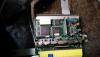
Two quick photos i can get? Standard ecu?
-
Cheers guys!!
-
cheers for the help, doesnt appear to have a manual boost controller but will take a look tomorrow and see. If there is a daugher board there i think thats the closest il get to winning the lottery!
-
I havent, only had a quick look under the panel and thought it was standard, i will whip it off after work tomorrow and take a look, will you be able to tell from photos?
-
Iam hoping it has a daughter board otherwise looks like il be splashing out on something mappable!
-
Ok so ihave just bought a classic impreza wrx, I ws told it was running about 260bhp and full 3inch decat, apexi induction kit. I removed the panel to see what ecu it had in. The box said Z4 but i noticed a HKS fuel cut defended surely it wouldnt need this on the z4 ecu? anyway i can check if it is a z4 ecu or if its been mapped/chipped? cheers in advance Mike
-
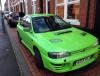
Just thought id introduce myself, my names Mike I live in Ormskirk and have just purchased my first Scooby. I am already in love with it and it's been nicknamed the HULK, previous owner painted it a ridiculous green but after having a rebuild in October and being surprisingly cheap I couldnt resist! Currently has full stainless steel decat, apexi induction kit, short shift, prodrive spoiler, turbo timer and is currently running a Z4 ECU. I have currently got it in at my regular mechanics being checked over, cant wait to get it back!! THE SNAKE SKIN IS GOING AS SOON AS I GET IT BACK!!!